


The scary part about reconciling a food truck day isn't the cash. Cash is annoying but honest — it either matches the drawer or it doesn't. The real money leaks live in the gap between what your card reader thinks happened offline and what actually settled to your bank two days later. That's where offline POS reconciliation for a food truck goes sideways, and it usually goes sideways quietly.
You park under an overpass at a lunch stop, cell signal drops to one bar, your reader flips into offline mode, and it keeps taking cards like nothing's wrong. Feels fine. Then that evening three of those transactions decline when the batch finally uploads, two refunds you issued at the curb never made it into the system, and your daily total is off by an amount you can't explain. Multiply that by four stops and you've got a number in your accounting that's fiction.
This is a tight, practical routine for closing out a day when part of it happened offline — cash, stored-and-forward card batches, and refunds — plus what to actually do when the sync fails instead of just staring at the error.
Why offline days break your numbers in the first place
Most POS apps have a "store and forward" mode. When the connection drops, the reader stops talking to the processor in real time and just records the card swipe locally, promising to send it later. The customer sees an approval. You see an approval. But that approval is provisional — the card hasn't actually been authorized yet.
The pattern that bites people: offline mode approves almost everything because it can't check. A card that's over limit, expired, or flagged gets a green light at the truck and a decline when the batch uploads. The customer already ate the tacos and left. That's not a rounding error, that's revenue you served and never collected.
Refunds are worse because they're bidirectional and easy to lose. You refund someone $14 in cash because the online refund won't process without signal, you scribble it on a receipt, and that note never makes it into the day's record. Now your cash drawer is short $14 with no matching entry, and you spend twenty minutes at 9pm hunting for a mistake that was actually a legitimate refund you forgot to log.
A typical example: a truck runs four stops, does roughly $2,600 in sales, and about $480 of that got captured offline across two low-signal locations. Two offline cards decline on upload ($31 and $27), one refund of $14 never gets logged, and the operator finds a $72 gap at close. They don't know if it's theft, a math error, or a sync issue. So they eat it. Do that three days a week and you're bleeding somewhere north of $200 a week on mystery variance alone — not counting the declines you never chase down.
The core idea: reconcile in layers, not all at once
The mistake almost everyone makes is trying to reconcile the whole day as one number. Total sales vs. total deposits. That's useless for offline days because the deposit hasn't settled yet, and you can't see which specific transactions failed.
Stop losing sales to poor planning.
Grubzly helps you plan routes, track inventory, and maximize daily sales effortlessly.
- Real-time route optimization
- Inventory tracking & alerts
- Mobile sales & reporting
No credit card required
-
Cash — because it's the only thing that's final the moment you count it.
-
Offline card batch — because it's provisional and needs to be tracked until it settles, separately from online card sales.
-
Refunds and voids — because they cross both cash and card and are the most commonly lost entries.
Keep each layer as its own reconciliation. Don't blend them. When something's off, you want to know which layer, not just that the day is short.
The daily closing routine
Do this at every stop if you can, but at minimum before you break down for the day. It takes about eight minutes once it's a habit.
Step 1 — Count cash before you touch anything else
Count the drawer. Subtract your starting float. Write the number down physically before you look at what the POS says. This matters — if you peek at the expected total first, you'll unconsciously "find" money to make it match. Count blind, then compare.
Step 2 — Pull the offline batch report separately
Most readers let you see a count of transactions still queued for upload. Note two things: how many offline transactions are pending, and their total value. This is your provisional card number. Do not treat it as revenue yet. Label it "pending settlement" in your ledger.
Step 3 — Log every refund and void, with a reason
Before you leave the stop, write down each refund: amount, cash or card, and a one-line reason ("wrong order," "card declined after food given," "customer complaint"). If you did a cash refund, the drawer will be short by that amount — which is correct, and the log is what proves it.
Step 4 — Force the sync while you still have options
Once you're back in signal, manually trigger the batch upload. Watch it. Don't just assume it went. This is the single step people skip, and it's the one that saves you. If it uploads clean, you'll immediately see any declines and can act on them. If it fails, you find out now instead of during next week's bank reconciliation.
A quick visual of the routine workflow:
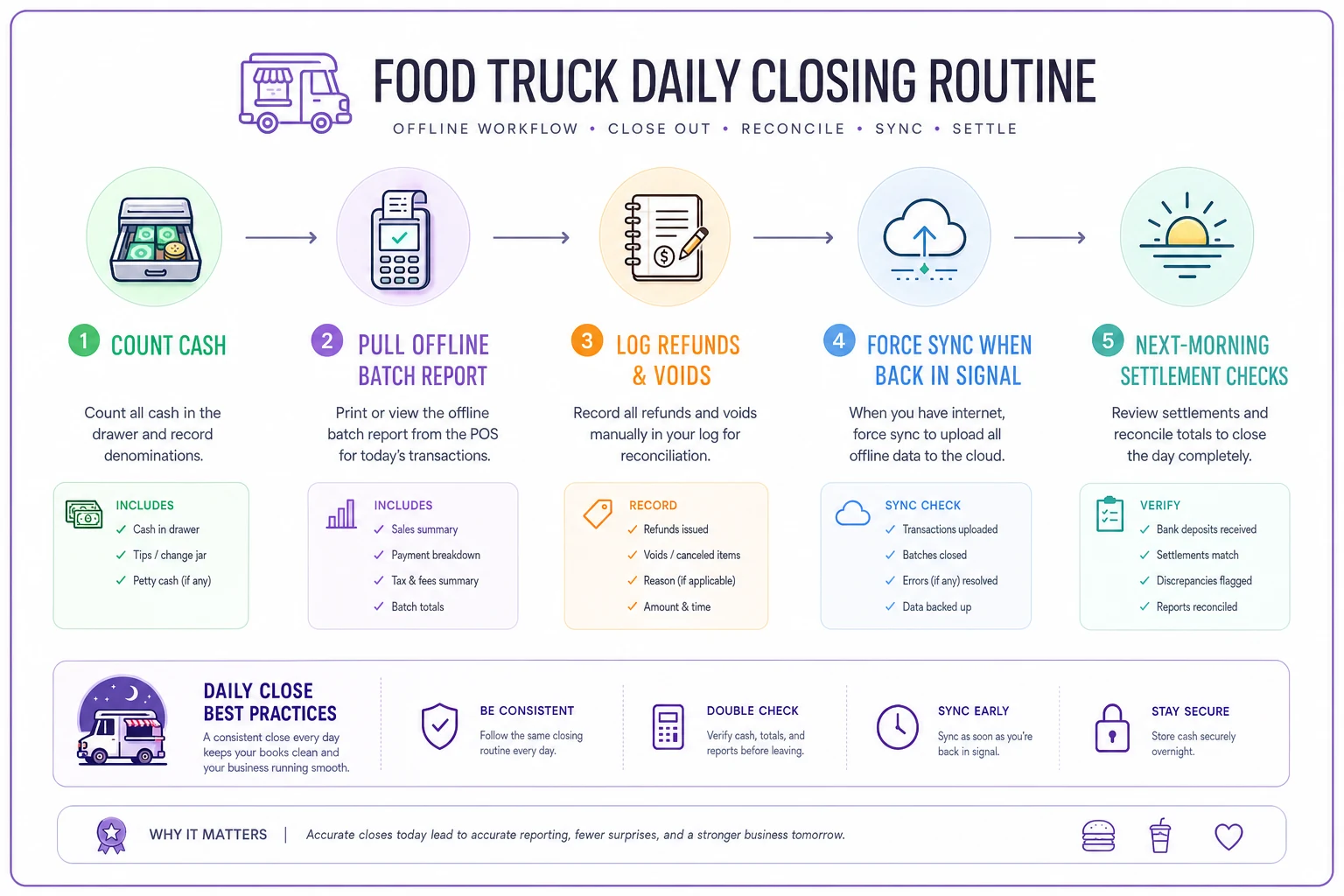
Step 5 — Match settled card totals the next morning
Card batches usually settle overnight. The next morning, compare what actually hit your processor's settlement report against what your POS said you sold. Any offline decline shows up here as a gap. This is a separate check from the day-of routine and it's non-negotiable for offline-heavy operations.
Once you've run this routine a few times, the steps start to blur together in a good way — you're not thinking about it, you're just doing it. That's when it actually protects you.
Sample ledger entries
Here's what a clean day with offline activity looks like written out. Numbers are illustrative but the structure is what matters.
| Line | Category | Amount | Status |
|---|---|---|---|
| Starting float | Cash | $150.00 | Final |
| Cash sales (counted) | Cash | $612.00 | Final |
| Online card sales | Card | $1,340.00 | Settled |
| Offline card batch | Card | $486.00 | Pending settlement |
| Cash refund — wrong order | Refund (cash) | -$14.00 | Logged |
| Card void — double charge | Void (card) | -$22.00 | Pending |
| Expected day total | $2,412.00 | Mixed |
Then, the next morning after settlement:
| Line | Category | Amount | Status |
|---|---|---|---|
| Offline batch — expected | Card | $486.00 | — |
| Offline batch — actually settled | Card | $428.00 | Settled |
| Variance | -$58.00 | Two declines | |
| Decline #1 (chase or write off) | Card | -$31.00 | Flagged |
| Decline #2 (chase or write off) | Card | -$27.00 | Flagged |
The point of splitting it this way: on day one your books show $486 as pending, not as banked revenue. When only $428 settles, you're not surprised and you're not scrambling to explain a $58 hole — you already flagged it as offline risk. The variance has a name.
Troubleshooting the sync errors that actually show up
Offline reconciliation lives or dies on the sync.
Here are the failures you'll actually hit and what to do, rather than generic "check your connection" advice.
-
Batch uploads but shows fewer transactions than you counted. The reader dropped some queued transactions, usually after a force-close or battery death mid-shift. Check for an "unsent" or "failed" transaction queue in the app — many keep a separate holding area. If a transaction is gone entirely, your handwritten refund/sale log at the stop is the only recovery. This is why Step 3 exists.
-
Duplicate charges after retry. You forced the sync twice because the first attempt looked like it hung. Now a customer got charged twice. Pull the settlement report, find the duplicate by timestamp and amount, and void one immediately. Waiting turns a two-minute void into a chargeback dispute.
-
Offline transaction declines on settlement. Nothing to "fix" technically — the card genuinely didn't authorize. Your only lever is whether you can contact the customer (rare for a walk-up). For most trucks this becomes a write-off, but track the total. If offline declines are running more than 2–3% of your offline volume, your low-signal stops are costing you real money and you should either get a signal booster or stop accepting offline cards there.
-
"Batch closed" but nothing settled to the bank. The batch closed on the reader but never transmitted to the processor. Usually a token or auth expiry. Reopen the batch or contact your processor same-day — most will let you retransmit within 24–48 hours. Past that window, those transactions can be permanently lost.
-
Time-zone or timestamp mismatch. Transactions land in the wrong day's report because the reader's clock drifted or you crossed a boundary near midnight. Annoying but harmless once you know — reconcile by transaction ID, not by date, when you see a day that's oddly off.
Offline reconciliation lives or dies on the sync.
Contingency handling: what to do when a stop is fully dead
Some stops have no signal, period. A tunnel-adjacent lot, a basement event, a rural festival field. Decide your policy before you get there, because the middle of a lunch rush is the worst time to figure it out.
-
Set a cash-preferred sign at dead-zone stops. Not cash-only — just nudge. It cuts offline card risk dramatically.
-
Set a per-transaction ceiling for offline cards (say $40). Big offline tickets are where declines hurt most, so route those to cash or a mobile payment app if you can.
-
Keep a paper refund pad in the window. Every offline refund gets written before it's given. No exceptions.
-
Assign one person the "sync check" the moment the truck rolls into signal. Not "someone" — a named person. Unassigned tasks don't get done during breakdown.
Assign the same person to the sync check every time the truck returns to signal.
This is the same offline-first thinking that shows up in loyalty and stored-transaction workflows generally: assume the connection will fail, and design the routine so a failure is a logged, expected event instead of a mystery.
Where software quietly earns its keep here
You can run all of this on a clipboard and a spreadsheet, and plenty of trucks do. The part that's genuinely painful by hand is matching next-day settlement reports against day-of provisional totals across multiple stops — that's a lot of manual line-by-line comparison, and it's exactly the kind of repetitive matching that AI-assisted operational tools handle well.
A reconciliation setup with some automation can flag the variance for you: it ingests the settlement report, compares it against what the POS recorded as offline-pending, and surfaces declined transactions automatically instead of making you scan two reports side by side at 7am. It doesn't replace the discipline — you still count cash blind and log refunds by hand — but it removes the tedious matching step where errors and skipped days creep in. The value isn't magic; it's that the boring daily check actually gets done because it takes thirty seconds instead of twenty minutes.
When this level of rigor makes sense (and when it's overkill)
If you're a single truck doing mostly cash at farmers' markets with decent signal, this full three-layer routine is more than you need. Count cash, glance at the card batch, done. Adding formal settlement matching to a low-offline operation is just friction.
Where it becomes essential:
-
You run multiple low-signal stops per day and offline card volume is a real slice of sales.
-
You do events and festivals where signal is unreliable and ticket sizes are larger.
-
You're running more than one truck and can't personally eyeball every close, so variance hides across the fleet.
For those operations, the mystery-variance write-offs stop being a nuisance and start being a line item. That's the threshold where a real routine pays for itself.
Bringing it together
Offline days don't have to end in a shrug and a guess. The trick is refusing to reconcile the day as one blurry number and instead treating cash, offline card batches, and refunds as three separate things with different levels of certainty. Cash is final. Offline cards are provisional until they settle. Refunds are the sneaky ones that cross both and vanish if you don't write them down at the window.
Count blind, force the sync while you still have signal, log every refund the second it happens, and check settlement against your provisional totals the next morning. Do that consistently and the $72 mystery gap turns into a $58 offline decline with two named transactions behind it — a number you can decide to chase or write off on purpose, instead of one that just quietly eats your week.
Count blind, force the sync while you still have signal, log every refund the second it happens, and check settlement against your provisional totals the next morning. Do that consistently and the $72 mystery gap turns into a $58 offline decline with two named transactions behind it — a number you can decide to chase or write off on purpose, instead of one that just quietly eats your week.
Ready to drive your food truck business forward?
Join 2,000+ food truck operators relying on Grubzly to boost efficiency, increase sales, and delight customers.