

Most food truck operators hit this same wall around month 18. You're consistently busy, customers love your food, and you're thinking about truck number two. Then you hire someone to run the original truck while you're off setting up the new one, and suddenly everything starts slipping. Food quality drops, customers complain about portion sizes, the new crew shows up late to the Saturday farmers market, and you're getting texts at 11pm about running out of napkins.
The problem isn't the people you hired. It's that everything that made your single truck successful lived in your head—the little adjustments you made automatically, the way you knew exactly how much chicken to prep for a Tuesday downtown lunch versus a Thursday brewery night, the specific order you loaded equipment so nothing got damaged in transit.
The Real Operational Test: Growing Past Yourself
This pattern has killed more than a few promising expansions. An owner in Phoenix went from one profitable taco truck to three trucks in about 8 months. By month 10, two trucks were losing money, food costs had jumped 35%, and his original customers were saying the food "wasn't the same." He ended up selling both trucks and going back to one.
The difference between operators who successfully scale and those who crash back down isn't money or even finding good staff. It's whether they build actual systems before they need them.
Why Single-Operator Habits Break Multi-Truck Operations
When you run one truck yourself, you develop unconscious micro-adjustments. You know that Stop & Shop parking lot gets slammed at 12:15 but dies by 1:30, so you prep heavy and push orders fast early, then slow down for quality when the rush fades. You automatically check fryer oil color in morning light because afternoon sun makes it look darker. You recognize a specific generator sound that means you've got about 2 hours before it needs oil.
Stop losing sales to poor planning.
Grubzly helps you plan routes, track inventory, and maximize daily sales effortlessly.
- Real-time route optimization
- Inventory tracking & alerts
- Mobile sales & reporting
No credit card required
These aren't really decisions anymore—they're reflexes. And that's exactly why scaling breaks everything.
Your second truck operator doesn't have those reflexes. They don't know the Downtown Plaza security guard likes his burger without pickles and tips well when you remember. They don't realize running the AC and fryer simultaneously trips the breaker on older generators. They definitely don't know that over 85 degrees, you need to rotate the chicken stock every 90 minutes instead of every 2 hours like the health code technically allows.
What looks like employee incompetence is usually system failure. You're asking people to replicate thousands of tiny decisions you don't even remember making.
The chaos compounds fast. Without clear portion controls, food costs swing 8–10% between trucks. Without standardized setup procedures, one truck takes 45 minutes to open while another takes 90. Without quality checkpoints, you don't find out about problems until customers post angry reviews—or just quietly stop coming back.
The Four Operational Layers That Need Different Systems at Each Scale
Single truck operations run on one layer: execution. You prep, you cook, you serve, you clean. Maybe you have one part-time helper, but essentially everything flows through you.
Two-truck operations suddenly need three layers working at once:
-
Execution — actually making and serving food
-
Coordination — making sure both trucks have supplies, coverage, and consistent standards
-
Quality control — checking that those standards actually get followed
Three to five truck operations add a fourth layer:
-
Resource allocation — deciding which truck gets the new fryer, who covers the profitable Saturday event, how to split commissary time
Most operators try to handle all these layers with the same tools they used for one truck—text messages, notebook lists, and memory. Each layer needs its own system, and those systems need to connect without you being the connection point. Otherwise you become the bottleneck that limits growth.
Building Your Base Layer: Execution SOPs That Actually Get Followed
Food truck SOPs longer than one page don't get read. If they require interpretation, everybody interprets them differently. If they don't match actual workflow, staff will quietly create their own versions anyway.
Start with the five highest-impact procedures that directly affect customer experience.
-
1. Opening Procedure (One page, photo-heavy)
-
2. Portion Control Standards (Visual guide)
-
3. Recipe Production Cards (Batch-focused)
-
4. Customer Service Standards (Scenario-based)
-
5. Closing Checklist (Prevents next-day disasters)
1. Opening Procedure (One page, photo-heavy)
-
Generator start sequence with photos of correct switch positions
-
Equipment startup order to prevent overloads
-
Temperature check points with acceptable ranges
-
First batch prep standards with portion photos
-
POS and card reader setup confirmation
-
Safety equipment check (fire extinguisher, first aid, etc.)
Don't write "ensure adequate ice levels." Write "Fill ice bin to the BLACK LINE (see photo). If below RED LINE at any point during service, refill immediately."
2. Portion Control Standards (Visual guide)
Create a photo board showing exact portion sizes using your actual serving containers, where the fill line should be for liquids, how many pieces for countable items, and weight checks for proteins using the scale you actually own. A burrito bowl operation cut food cost variance from 12% to 3% just by switching from written portions ("6 oz chicken") to photos showing exactly how full the portion cup should look.
3. Recipe Production Cards (Batch-focused)
Skip the culinary school format. Food trucks need batch recipes with the batch size that fits your actual equipment, prep time for that exact quantity, hold time and temperature requirements, a reorder trigger ("When down to 2 portions, start next batch"), and notes on common mistakes specific to that recipe.
4. Customer Service Standards (Scenario-based)
-
"Order wrong but customer already bit into it" → Apologize, offer free side or drink, note in shift log
-
"Out of menu item" → Suggest a specific alternative, offer 10% discount if they seem frustrated
-
"Credit card machine down" → Direct to nearest ATM, offer to hold order, accept Venmo/Zelle if over $15
5. Closing Checklist (Prevents next-day disasters)
Time-stamped tasks that prevent tomorrow's problems:
-
30 min before close
Last call announcement, turn off one fryer
-
15 min before close
Count remaining portions, text tomorrow's operator about any shortages
-
At close
Specific equipment shutdown sequence
-
Close +15
Waste log, cash reconciliation, photo of clean stations
-
Close +30
Truck locked, generator secured, keys in designated spot
Close +30: Truck locked, generator secured, keys in designated spot
The Coordination Layer: Systems That Keep Trucks in Sync
Once you have two trucks, information gaps get expensive fast. Truck A doesn't know Truck B used the last case of burger patties. Truck B doesn't know Truck A already visited the Northside brewery and irritated them by showing up unannounced again. Nobody knows who's supposed to deep clean the commissary freezer.
Shared Inventory Tracking
Forget complex inventory software at this stage. You need something drivers can update from their phones in 10 seconds. A shared spreadsheet works fine if it has item name, par level, current count, who updated it and when, and a clearly marked reorder trigger.
The key is that updates happen during existing workflow, not as an extra task. When grabbing supplies from the commissary, staff are already counting—just record it. When loading the truck, they're already checking items—capture that check.
Territory and Schedule Coordination
Nothing damages your reputation faster than two trucks showing up at the same spot, or nobody showing up to a location you promised.
Keep a daily schedule board with truck assignment, primary location and arrival time, a backup location if the primary falls through, driver name and contact, and special events or catering marked separately. Alongside that, maintain a weekly territory map showing regular spots claimed by each truck, flexible zones anyone can use, blackout zones for construction or permission issues, and new spots being tested with a truck assigned.
Communication Protocols
-
Morning check-in by 9am
"Truck 2 loaded, heading to City Plaza, ETA 10:30"
-
Mid-shift update at 2pm
"Lunch sales: $820. Running low on pulled pork. Generator struggling."
-
End-of-shift report at close +30
"Total sales: $1,340. Out of: coleslaw. Need: propane, napkins. Issue: POS froze twice."
Cross-Training Matrix
Document who can do what—primary truck assignment, which trucks each person is trained on, approved locations, and any special skills like generator troubleshooting or bilingual service. This prevents the Saturday morning panic when your main driver calls in sick and you realize nobody else knows how to work the new truck's equipment.
Quality Control: Trust but Verify
Quality naturally degrades when you're not watching. It's not malicious—it's just how it goes. Standards drift, shortcuts become habits, and small problems compound into reputation damage before you notice.
Build quality checks into daily operations rather than treating them as occasional audits.
Photo Documentation Points
Morning truck setup, first plate of each shift, a peak hour shot showing proper staffing and workflow, and end-of-shift cleaning. Photos take 3 seconds and eliminate the "that's not how we left it" arguments before they start.
Require operators to label photos with truck name and shift time to avoid confusion.
Customer-Facing Quality Indicators
Track what customers actually experience: ticket times during rush (should stay within about 20% of target), wait complaints per 100 orders, portion complaints per 100 orders, and how often you hear "not as good as usual." When these numbers drift, you know exactly where to focus training.
Random Spot Checks
Show up unannounced without making it feel like surveillance. Buy food like a regular customer, check temperatures with your own thermometer, observe workflow without interfering, then review the cash handling and maintenance logs. The goal is catching standards drift before it becomes habit—not catching people doing something wrong.
Weekly Scorecards
Each truck gets a simple weekly score covering sales versus projection, food cost versus target, customer complaints, equipment issues, and schedule adherence. Post scores where staff can see them. Peer pressure drives improvement better than manager pressure does in most situations.
Scaling Triggers: When to Add Systems
Most operators wait until things break to add systems. By then you're fixing problems while they're actively costing money.
| Situation | System to Add |
|---|---|
| First employee hired / absent 2+ days per week | Core SOPs |
| Customer complaints about inconsistency | Portion standards and quality checks |
| Food costs vary more than 5% week-to-week | Portion controls and batch recipes |
| Planning truck #2 | Coordination layer |
| Repeating the same instructions weekly | Communication protocols |
| Can't observe every shift personally | Quality control system |
| 3+ trucks operating | Resource allocation system |
| Maintenance delays affecting service | Equipment tracking |
The table above isn't meant to be a rigid checklist—some of these will overlap, and you'll probably recognize two or three situations at once. That's fine. Just start with whatever is actively costing you money right now.
The Hidden Failures That Kill Multi-Truck Operations
Everyone expects the obvious challenges—finding good staff, maintaining food quality, managing multiple locations. The hidden failures are what actually take growing operations down.
Decision Fatigue Cascade
When you're making hundreds of micro-decisions daily across multiple trucks, judgment degrades. You approve questionable supplier substitutions. You skip maintenance to avoid 3 days of downtime. You let standards slide because you're too tired to have the conversation.
The fix is building decision templates for recurring choices—an approved substitute list for supplier shortages with max price variance, specific trigger points for repair versus replace on equipment, a coverage matrix for time-off requests, and defined cancellation criteria when weather threatens an event.
Information Delay Loops
Truck A has a problem Tuesday morning. You find out Tuesday night. You communicate the fix Wednesday morning. Truck B hits the same problem Wednesday afternoon. By Thursday, three trucks have had the same preventable issue. Create immediate broadcast triggers: equipment failure goes out as a group text with a photo and temporary fix, supplier shortages get logged with an alternative source, and location issues update the territory map the same day.
Institutional Knowledge Drain
Your best operator quits. They take with them fifty undocumented tricks that made their truck run smoothly. The replacement struggles, quality drops, and customers notice. Capture operational knowledge continuously through weekly "what worked" reports from each operator, photo documentation of efficient setup methods, written troubleshooting guides for common problems, and video recordings of complex procedures.
Accountability Gaps
With one truck, you know exactly who forgot to clean the fryer. With four trucks, problems become "someone else's fault." Clear ownership assignments fix this—each task has one name attached, each truck has a designated captain per shift, each metric has a specific person tracking it, and each problem has a documented resolution owner.
From Paper to Practice: Making Systems Actually Work
The gap between writing procedures and people following them is where most operations fail. You can't just hand someone a checklist and expect consistent execution.
-
Week 1
Morning opening checklist only
-
Week 2
Add portion control standards
-
Week 3
Add closing procedures
-
Week 4
Add quality photo checks
Each week, the previous system becomes habit before adding something new.
Make the Right Way the Easy Way
If your system requires extra steps, people will skip it under pressure. Pre-portioned containers eliminate measuring. Setup diagrams prevent equipment damage. Prep sheets prevent overproduction. Design systems that actually save time during service, not just systems that feel organized on paper.
Built-In Feedback Loops
Systems without confirmation are just wishes. Checklists need photo proof, temperature logs need timestamps, inventory counts get verified by the next shift, and cash reconciliation happens before anyone leaves.
Failure Recovery Protocols
Plan for when systems break, because they will. If the morning checklist gets missed, run an abbreviated safety check. If portions run over, define which menu items to 86 first. If the communication system goes down, fall back to group text. If a key person calls in sick, the coverage plan is already documented.
Where Automation Actually Helps
The food businesses that scale well don't automate everything. They automate the repetitive coordination tasks that eat time without adding real value.
Think about how much time goes into texting the same updates to multiple people, manually copying sales data into spreadsheets, figuring out who's scheduled where tomorrow, calculating inventory orders, or tracking which truck needs maintenance. These tasks are necessary but they don't require human judgment—they just require consistency.
Here's a practical example of how that flow actually works:
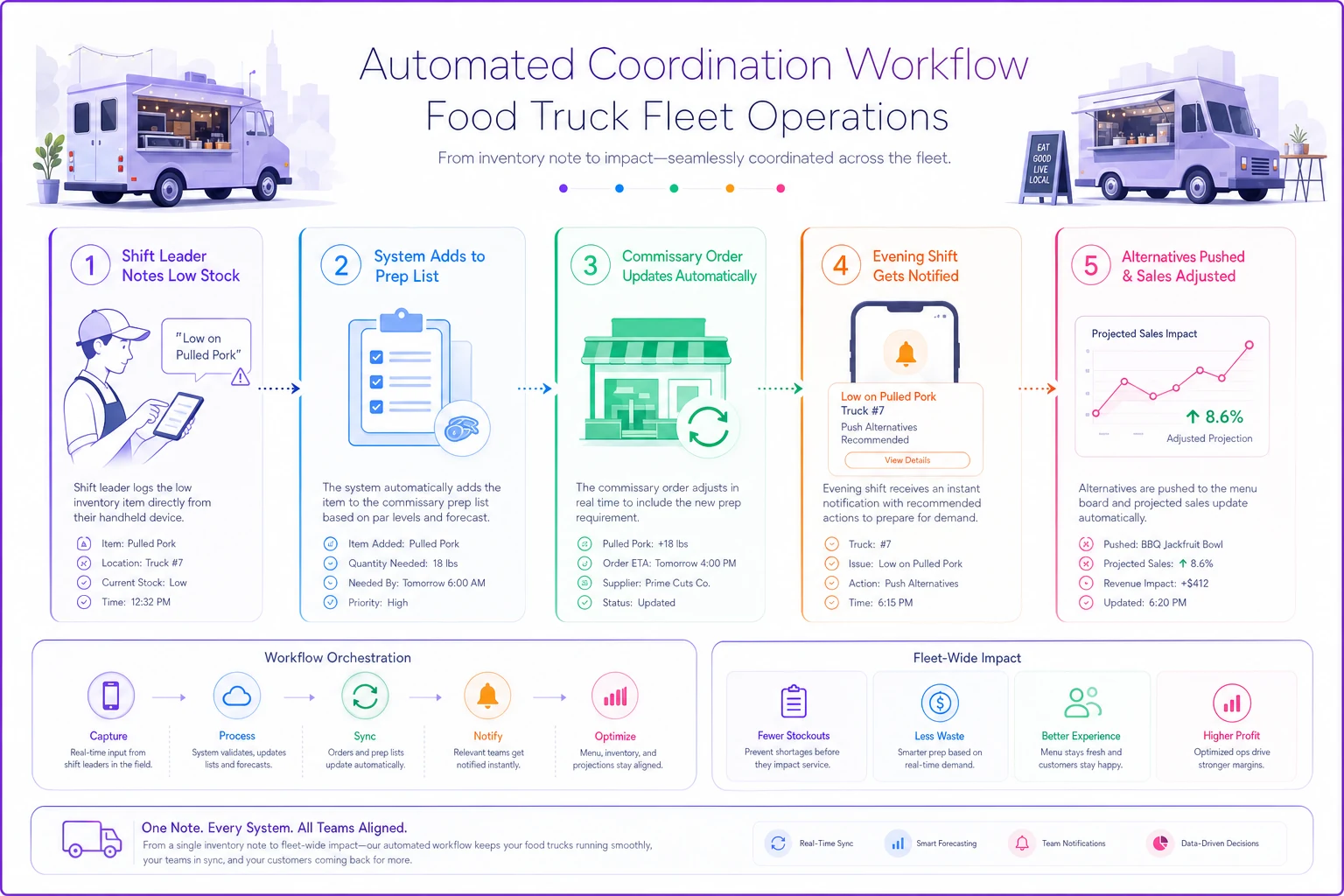
Shift leader marks "low on pulled pork" during morning truck check ↓ System adds it to tomorrow's commissary prep list ↓ Adjusts the commissary order automatically ↓ Notifies evening shift to push alternative proteins ↓ Updates projected sales impact for the day
That's four manual communications handled automatically, which reduces errors and saves roughly 15–20 minutes of coordination time per truck per day. Not dramatic, but across three trucks over a week it's a real number.
The key is choosing software that matches your actual workflow rather than forcing your operation into rigid software requirements. Good platforms adapt to your patterns—which locations need extra portions on Fridays, which staff combinations work best together, when equipment typically needs service based on usage history.
Your 90-Day Scaling Roadmap
Whether you're planning truck number two or already juggling three, here's a practical timeline for building systems that prevent quality breakdowns before they happen.
Days 1–30: Foundation
Document your five core procedures—opening, portions, recipes, service, closing. Create photo guides for critical standards. Implement morning and evening check-in protocols. Start tracking daily sales and issues consistently.
Days 31–60: Coordination
Build shared inventory tracking, create a territory assignment map, establish staff communication protocols, implement weekly scorecards, and start random quality checks.
Days 61–90: Optimization
Add decision templates for common scenarios, create troubleshooting guides for equipment issues, build out your staffing coverage matrix, implement a progressive training program, and consider operational software for coordination tasks.
Ongoing
Weekly operator feedback sessions, monthly system refinement based on actual problems, quarterly quality standard reviews, and an annual full system audit. Systems need maintenance the same way equipment does.
The Difference Between Growing and Just Getting Bigger
Plenty of food truck operations add trucks. Far fewer maintain quality and profitability while doing it. The difference isn't luck or access to capital—it's whether you build systems before you need them.
Your single truck success came from your personal standards and attention to detail. Multi-truck success comes from translating those standards into something other people can execute consistently, even when you're not there.
Start with one system. Make it simple enough that a tired person at the end of a long shift can follow it correctly. Test it, refine it based on what actually happens, then add the next layer. Each system reduces your personal involvement in basic operations and frees you up to handle the problems that actually require your judgment.
Scaling also changes your role whether you're ready for it or not. You're no longer primarily cooking food—you're building and maintaining the system that ensures good food gets cooked. That transition feels uncomfortable for hands-on operators, but there's no way around it if you want real growth.
Your customers don't care how many trucks you run. They care about getting the same quality food and experience they've come to expect. Build the systems now while you have the bandwidth, or scramble to implement them while your reputation and margins erode. Most operators choose scrambling and end up scaling back. The ones still growing profitably a few years in treated systems as seriously as they treated food quality from the very beginning.
Start with one system. Make it simple enough that a tired person at the end of a long shift can follow it correctly. Test it, refine it based on what actually happens, then add the next layer.
Ready to drive your food truck business forward?
Join 2,000+ food truck operators relying on Grubzly to boost efficiency, increase sales, and delight customers.