


Four trucks loading at 5:30 AM in a shared commissary kitchen. Three different routes. Multiple stop types. By 7 AM, someone's already driving back because they grabbed the wrong cambro for their third stop, another truck has produce sitting on top of raw chicken, and the breakfast burrito truck just realized half their tortillas are still in the walk-in.
This isn't about being disorganized. Your crew knows their jobs. The problem is that commissary-to-truck transfers for multi-stop days create a perfect storm of chaos: time pressure, limited staging space, cross-contamination risks, and zero documentation when something goes wrong.
The worst part? Most operators don't figure out how much this costs them until they actually start tracking it. One taco truck operation found their loading mistakes were running them about $1,800 a month — between drive-backs, spoiled product from improper loading, and missed sales at stops. That's before counting the health code violations waiting to happen.
Why standard loading procedures fall apart on multi-stop routes
Single-destination loading is simple. Everything goes on the truck, you drive to your spot, you serve. Multi-stop loading is an entirely different operation.
Think about a typical multi-stop day. Your downtown lunch stop needs 150 portions. The office park needs 80 portions with a different menu. The evening brewery spot needs completely different inventory plus dinner prep. Each stop has a hard arrival window — miss 11:45 AM downtown and you lose the entire lunch rush.
Traditional checklists assume everything loads at once. They don't account for the reverse chronology problem: your last stop loads first but also sits on the truck the longest. If you're loading at 6 AM and your brewery stop is at 7 PM, those items are on that truck for 13 hours.
Staging compounds everything. Most commissaries give you a small prep area, not a loading dock. You're fighting for space with other trucks, trying to keep temperatures controlled, while the clock moves toward your first service window.
Health inspectors love catching commissary transfer violations too. Raw proteins dripping onto ready-to-eat items. Temperature abuse during staging. No documentation proving proper handling. One food truck got hit with $4,500 in fines after an inspector showed up during their morning load and found three critical violations in their staging area.
Building a time-stamped loading system that actually works
The solution isn't starting earlier or moving faster. You need a loading system built for multi-stop complexity.
Stop losing sales to poor planning.
Grubzly helps you plan routes, track inventory, and maximize daily sales effortlessly.
- Real-time route optimization
- Inventory tracking & alerts
- Mobile sales & reporting
No credit card required
Start by reverse-engineering your route. Map out every stop's arrival time, then work backwards. If stop three needs service at 3 PM and drive time is 25 minutes, those items need to be reachable by 2:30 PM without digging through everything else.
-
Stop 1 - Downtown (11
45 AM service)
- Load time: 6:35–6:40 AM - Position: Truck rear, left side - Items: Hot items in cambro A, cold items in cooler 1, dry goods in bin 1 - Access method: Direct pull, no unstacking needed -
Stop 2 - Office Park (1
30 PM service)
- Load time: 6:25–6:30 AM - Position: Truck middle section - Items: Pre-portioned containers in cambro B, beverages in cooler 2 - Access method: Remove bin 1 only -
Stop 3 - Brewery (7
00 PM service)
- Load time: 6:15–6:20 AM - Position: Truck front, secured - Items: Dinner prep in cambro C, beer-pairing items separate - Access method: Requires removing stops 1 and 2 items
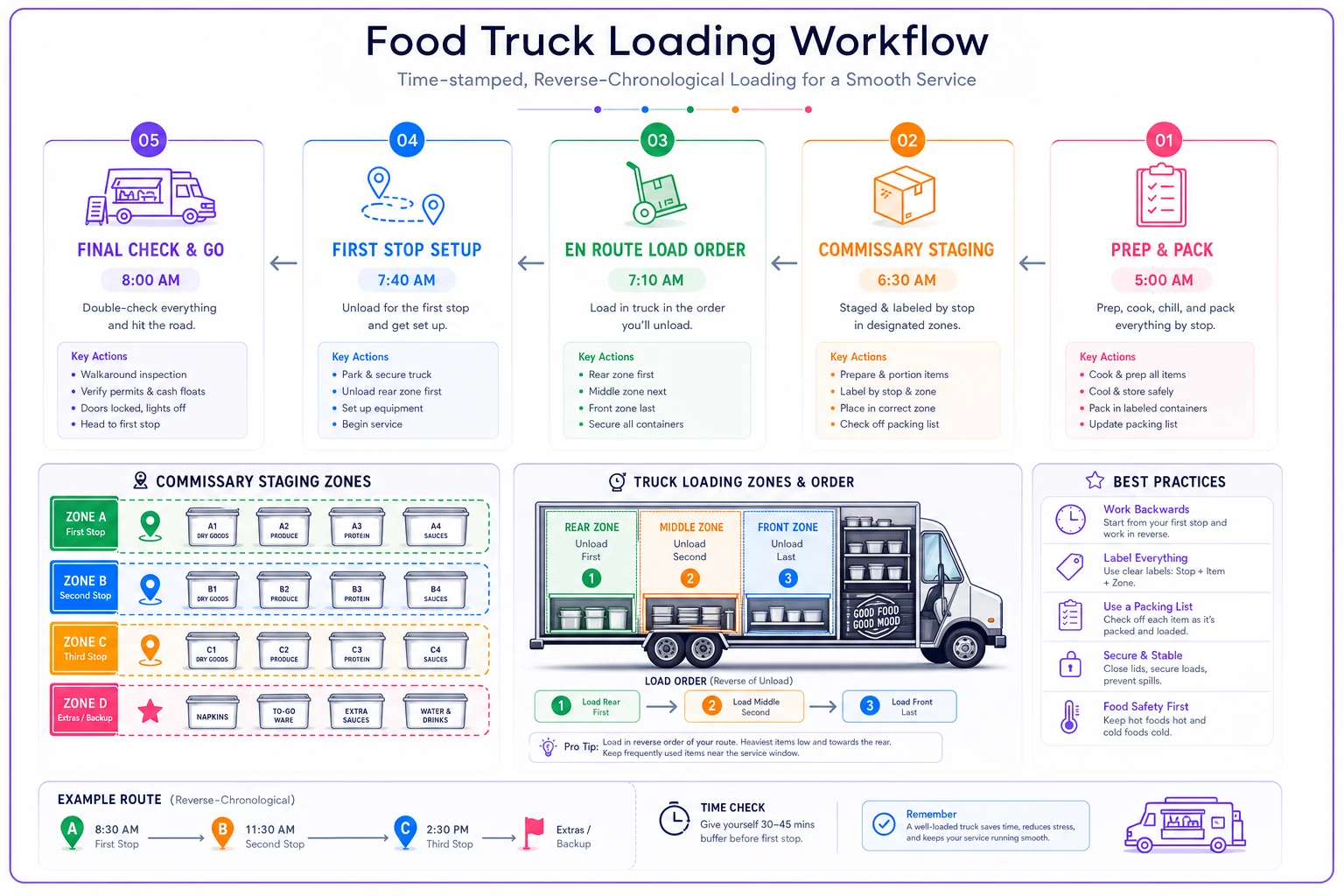
Notice the reverse loading order. Stop 3 loads first but sits deepest in the truck. Each zone is defined. Nobody's digging through dinner prep to grab lunch service items at 11:30 AM.
The time stamps also matter for temperature control. Document when cold items leave refrigeration. If your health department requires disposal after four hours in the danger zone (41–135°F), you need proof of timing. One pulled pork truck avoided a violation because their loading photos showed the product had only been in that range for 3 hours 45 minutes.
Staging zones and contamination controls
Physical staging prevents most loading errors. Mark your commissary floor with tape — different colors for each stop. Blue for Stop 1, yellow for Stop 2, red for Stop 3. Sounds overly simple, but it works under pressure.
Use bright painter's tape and waterproof labels so markings survive heavy cleaning and rain.
Raw proteins need completely separate staging. Never stage raw chicken above or near ready-to-eat items, even briefly. Color-coded containers help: red for raw, green for vegetables, blue for ready-to-eat. The visual distinction catches rushed mistakes before they become health code violations.
Get some elevation into your staging area. Milk crates or wire shelving keeps items off the floor and adds real organizational layers. Stack by stop number, temperature requirement, and contamination risk.
Label everything twice — once on the container, once on a master sheet. The container label says what's inside and which stop it belongs to. The master sheet tracks every item, its truck position, and its temperature requirements. It seems redundant until the one morning someone grabs the wrong cambro and the label on the master sheet is the only thing that catches it in time.
The photo evidence system that protects your business
Photos aren't just for Instagram. They're operational documentation.
-
Wide shot of staged items per stop
-
Close-up of temperature logs
-
Protein storage showing separation
-
Final truck organization before departure
-
Thermometer readings for hot and cold items
Create a simple naming system. "Truck1Stop2Staging_0625AM.jpg" tells you everything at a glance. Keep these for at least 30 days. When a customer claims they got sick or an inspector questions your procedures, you have actual evidence instead of a verbal account.
One burrito truck avoided a lawsuit when their loading photos proved the "undercooked chicken" a customer complained about was pre-cooked, properly reheated product that met all temperature requirements at load time.
Physical sign-off procedures that catch mistakes
Digital checklists are great until your phone dies or the app crashes at 5:45 AM. Physical sign-offs with wet signatures still matter for multi-stop loading.
Your checklist needs three verification levels:
-
Level 1
Item verification
- [ ] All Stop 1 items staged - [ ] All Stop 2 items staged - [ ] All Stop 3 items staged - [ ] Temperature logs completed - [ ] Allergen items separated Signature: Time: -
Level 2
Loading verification
- [ ] Stop 3 items loaded first (front position) - [ ] Stop 2 items loaded second (middle position) - [ ] Stop 1 items loaded last (rear position) - [ ] Cold chain maintained - [ ] No cross-contamination observed Signature: Time: -
Level 3
Departure verification
- [ ] All items for all stops on truck - [ ] Temperature equipment functioning - [ ] Photos documented and saved - [ ] Route sheet on board - [ ] Emergency re-supply plan confirmed Signature: Time:
Different people should sign each level when possible. The person staging shouldn't be the same one loading. Fresh eyes catch what tired eyes miss.
Real-world implementation: three-truck taco operation
A taco truck operation running three trucks out of one commissary rebuilt their entire loading process after tracking their mistakes for two weeks. They were averaging around four loading errors a week — forgotten items, wrong quantities, contamination risks.
Old system:
-
Everyone loads at once, first-come-first-served for staging space
-
Verbal confirmations only
New system:
-
Staggered loading times (15-minute intervals between trucks)
-
Dedicated staging zones marked with colored tape
-
Photo documentation at three checkpoints
-
Physical sign-off sheets with carbon copies
-
Weekly route maps posted in the commissary
| Metric | Before | After |
|---|---|---|
| Weekly loading errors | ~4 | Less than 1 |
| Drive-back trips | Multiple weekly | Eliminated |
| Average load time per truck | Baseline | Down ~12 minutes |
| Health code violations | Present | Zero during surprise inspection |
| Monthly savings (waste + missed sales) | — | ~$2,100 |
The key change wasn't the checklist itself — it was building a system that acknowledged multi-stop complexity instead of pretending it was the same as loading one truck for one stop.
Making this work with limited commissary space
Shared commissaries create their own problems. You're working around other vendors' schedules, fighting for refrigeration access, staging in tight quarters.
-
Minutes 1–10
Pull all items from storage
-
Minutes 10–25
Stage by stop and temperature zone
-
Minutes 25–35
Load the truck systematically
-
Minutes 35–45
Final verification and photos
Use vertical space. Wall-mounted clipboards for checklists. Overhead storage for non-food items. Mobile wire shelving that rolls directly to the truck. In a cramped commissary, every square foot counts.
Talk to the other trucks too. The breakfast crew loading at 5 AM doesn't need the same equipment as the lunch truck rolling out at 9 AM. Share staging tables, swap time slots, help with heavy lifting. Those relationships matter more than most operators realize.
When automated tracking makes sense vs. overkill
Not every operation needs sophisticated inventory tracking systems. A single truck with two stops can probably get by with paper checklists. But some situations genuinely demand more robust documentation.
You probably need automated tracking when:
-
Running 3+ trucks from one commissary
-
Serving 4+ stops per route
-
Managing temperature-sensitive items across long routes
-
Multiple people handle loading
-
Health department requires detailed documentation
-
Insurance claims are happening with any regularity
You likely don't need it when:
-
Single truck, simple routes
-
Same inventory for every stop
-
One person handles loading consistently
-
Minimal temperature-sensitive items
The decision usually comes down to error frequency and cost. If loading mistakes are running you more than $500 a month, automation pays for itself quickly. If you're making one mistake a month that costs $50, manual systems are fine.
Preventing the cascade failure effect
One loading mistake rarely stays isolated. Forget the tortillas for Stop 1 and suddenly you're late, Stop 2 gets delayed, Stop 3 might get cancelled, and tomorrow's prep is scrambled because you're already behind.
Build some redundancy into your loading. Not full backup inventory — just enough to survive one stop going sideways. Basic proteins, common sides, backup packaging. A small buffer that buys you options when something goes wrong mid-route.
Create abort procedures for each stop. If Stop 2's items are contaminated or forgotten, what's the minimum viable service? Can you pull from Stop 1's excess? Which items can you 86 while still running a functional service window?
Document your failure points too. Every loading mistake tells you something. The cooler that doesn't seal. The cambro that looks identical to three others. The staging area that floods when it rains. Fix the systematic issue, not just the individual incident.
Commissary relationships and loading efficiency
Your commissary manager can make or break your loading system. They control access times, storage locations, and equipment availability.
Share your loading schedule with commissary staff. They know when you need the dock clear. They'll warn you about equipment maintenance or unusual vendor schedules. One food truck operator avoided a serious disruption when their commissary manager gave them a heads-up about a 6 AM fire inspection that would have completely blown up their normal loading window.
Invest in commissary improvements that help everyone. Better staging area lighting. Clear shared labeling systems. Communal equipment like dollies or cambro carts. The $200 you put into industrial shelving might save every truck in the facility hours each month.
And follow commissary rules without exception. Clean up your staging area. Return equipment immediately. Don't block other vendors' access. Being the easy tenant earns you flexibility when you need emergency loading times or extra space for a big event.
Making the system stick when everyone's exhausted
The best loading system breaks down if your team can't execute it at 5 AM after closing at midnight. Simplicity has to come first.
Laminate your checklists. Wet erase markers work in rain and grease. Hang them at eye level where people naturally stand while loading. If someone has to hunt for the checklist, they won't use it.
Build the habit gradually instead of enforcing everything at once. First week: just practice the staging layout. Second week: add photo documentation. Third week: implement full sign-offs. Gradual rollout creates lasting habits instead of compliance theater.
Cross-train on loading responsibilities too. The same person shouldn't always handle the complex dinner prep staging for Stop 3. Rotation prevents single points of failure and keeps people from going on autopilot.
The real cost of fixing your commissary-to-truck transfer
Setting up a proper loading system for multi-stop routes takes real upfront work. Expect to spend 10–15 hours designing the system, training your team, and working through the early problems. Materials run maybe $200 — tape, markers, clipboards, basic storage.
| Problem | Estimated Cost |
|---|---|
| One drive-back weekly | ~$40 in fuel and lost sales |
| One contamination incident | $500–$5,000 in fines |
| One missed stop from forgotten items | $300–$500 in lost revenue |
| Customer complaints from wrong orders | Reputation damage that compounds |
| Team frustration from preventable mistakes | Turnover costs you don't see coming |
Most operations see positive ROI within three weeks. The systematic approach means problems get solved once instead of over and over.
Beyond basic checklists
Your commissary-to-truck transfer is the foundation of every service day. When it works, everything downstream flows. When it doesn't, you're managing chaos from the first stop to the last.
The format matters less than consistency. Paper checklists, photo documentation, or digital tracking — the core principles don't change: reverse-chronological loading for multi-stop routes, clear staging zones with contamination controls, documented evidence at critical handoff points, and physical sign-offs that create real accountability.
Start with one improvement. Find your biggest pain point — maybe it's temperature documentation, maybe it's staging organization — and fix that before touching anything else. Build momentum with small wins before overhauling the whole operation.
The goal isn't a perfect system. It's a system robust enough to handle tired people, tight schedules, and shared spaces while preventing the expensive mistakes that quietly eat into food truck profitability. Every minute spent organizing the load saves five minutes of chaos during service.
The goal isn't a perfect system. It's a system robust enough to handle tired people, tight schedules, and shared spaces while preventing the expensive mistakes that quietly eat into food truck profitability. Every minute spent organizing the load saves five minutes of chaos during service.
Ready to drive your food truck business forward?
Join 2,000+ food truck operators relying on Grubzly to boost efficiency, increase sales, and delight customers.