

Running two POS terminals on a busy truck feels smart until the day they both go offline and reconnect hours later, each pushing its own version of reality into your reports. Suddenly you've got phantom sales, duplicate tickets, and a close that doesn't match your cash drawer by some stubborn amount you can't explain.
The messy part isn't offline mode itself. Most modern POS apps handle offline orders fine. The problem is what happens when two terminals were both taking orders — sometimes for the same customer who walked from one window to the other — and then reconnect and sync independently. That's when duplicates breed, and most operators discover it three days later when the numbers are already cold.
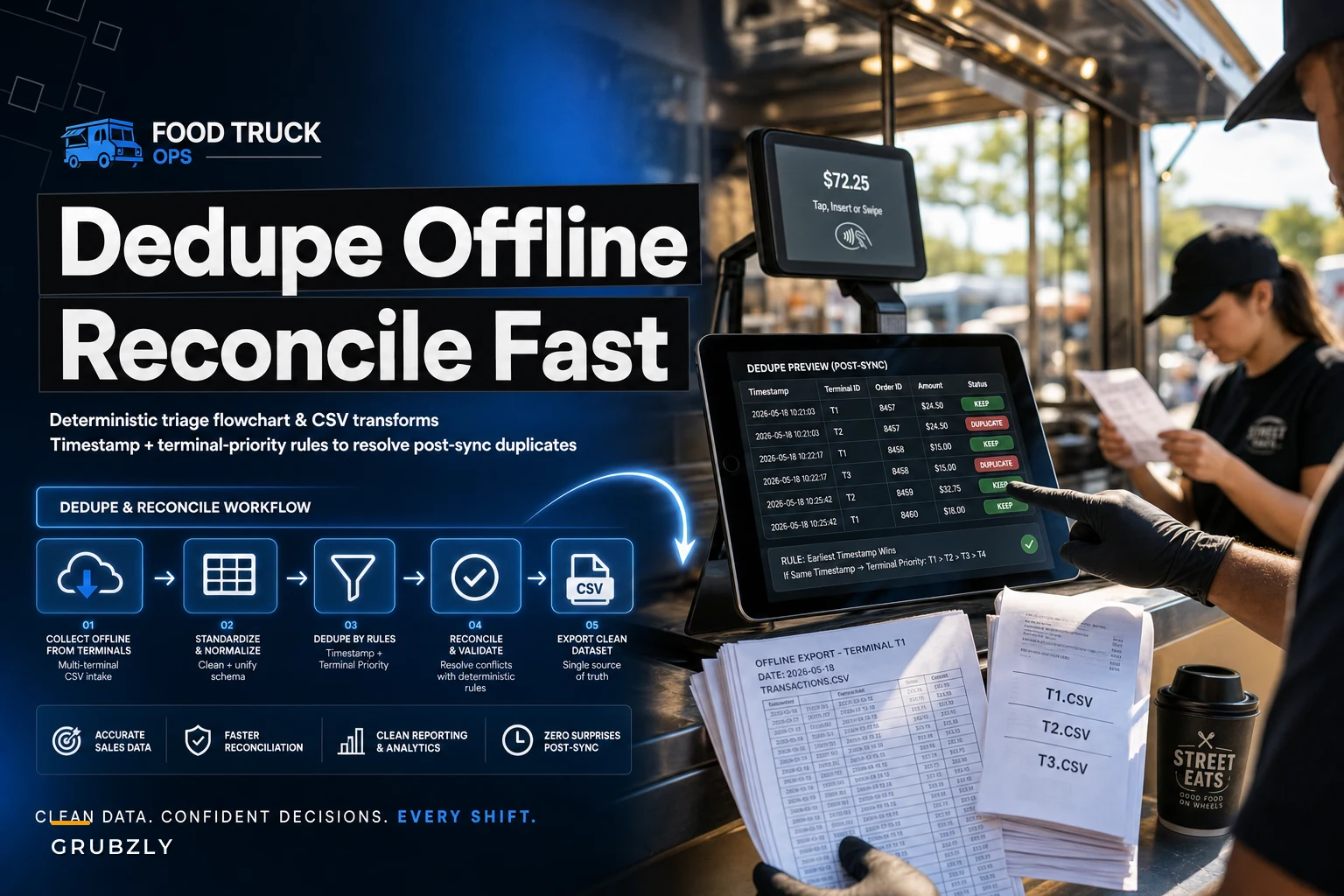
This post is narrow on purpose. It's about one thing: how to deduplicate and reconcile transactions across multiple terminals after an offline stretch, using rules you can apply the same way every single time instead of guessing per transaction.
Why multi-terminal dedupe is its own animal
Single-terminal reconciliation is annoying but linear. One device, one queue, one sync. You can usually eyeball what happened.
-
True duplicates — the same sale recorded twice because a cashier re-rang an order they thought didn't go through when the screen froze.
-
Split-window duplicates — customer orders at Terminal A, it looks stuck, they walk to Terminal B, re-order, both eventually sync. Two charges, one burrito.
-
Clock-drift collisions — two genuinely different sales that land on nearly identical timestamps because one terminal's clock drifted during the offline window.
-
Re-sync echoes — the POS retries a sync and pushes the same batch twice. Pure software artifact.
Each of these needs a different resolution. That's the whole reason you need a deterministic flowchart instead of instinct. Treat all four the same way and you'll either delete real revenue or keep fake revenue — both wreck your close.
The deterministic triage flowchart
"Deterministic" just means: given the same two records, you'd always make the same call. No judgment calls, no "well it depends." The decision order below holds up across real offline days.
Stop losing sales to poor planning.
Grubzly helps you plan routes, track inventory, and maximize daily sales effortlessly.
- Real-time route optimization
- Inventory tracking & alerts
- Mobile sales & reporting
No credit card required
The process works by running each suspected duplicate pair through these checks in order and stopping at the first rule that fires:
-
Identical transaction ID across terminals? If both records carry the same backend-assigned transaction ID, it's a re-sync echo. Keep one, kill the other. No ambiguity.
-
Same terminal ID + same local order number? That's a within-terminal double-ring. Keep the earliest, flag the rest.
-
Different terminal IDs, item lines match exactly, timestamps within 90 seconds? Treat as a split-window duplicate. This is the dangerous one — resolve using the timestamp-vs-terminal priority rules below.
-
Different terminal IDs, item lines match, timestamps more than 90 seconds apart? Treat as two separate sales unless payment method and last-4 of card also match. Two people can order the same thing.
-
Partial line-item overlap? Not a duplicate. Leave both. Partial overlap almost always means two real orders that happen to share a popular item.
The 90-second window isn't magic — it's just long enough to cover a frustrated customer walking between windows and short enough to avoid catching two unrelated buyers. On slower trucks you can stretch it to 120 seconds. On a lunch-rush truck pushing a ticket every 20 seconds, tighten it to 60 or you'll start flagging real sales.
After the checks run, every flagged pair feeds into the resolution step — payment status first, then terminal hierarchy, then timestamp as a last resort. That three-stage resolution is what keeps the whole flowchart consistent rather than a judgment call dressed up as a process.
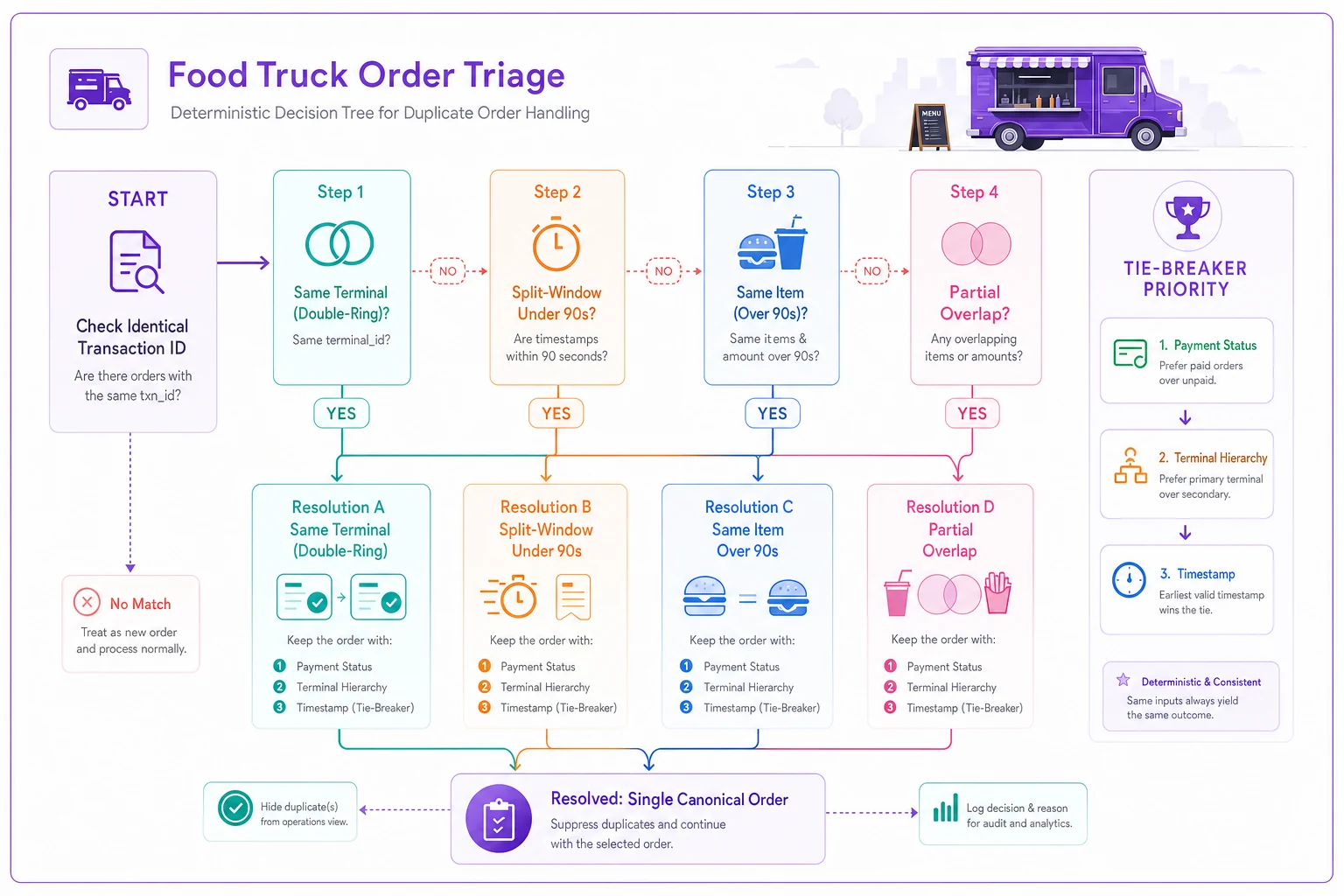
The flowchart maps each check to its resolution branch so you can apply the same rule set every time.
Timestamp vs terminal ID: which wins when they disagree
When you've got a split-window duplicate (rule 3 above), you have to decide which record survives. The instinct is to keep the earlier timestamp. That's wrong often enough to cause real problems, because the "earlier" record is frequently the one that got stuck — the reason the customer walked to the second window in the first place.
The reliable priority order is:
-
Keep the record with a completed payment capture over one with a pending or authorized-only status, regardless of timestamp. A stuck order is usually the ghost.
-
If both show completed payment, keep the one whose terminal is designated your primary for that stop and void the secondary. This is where a fixed terminal ID hierarchy pays off — decide in advance that Terminal A is always the survivor in a tie.
-
If payment status is identical and you have no primary designated, keep the later timestamp, because the re-order is the one the customer actually stood and paid for while watching the screen confirm.
The underlying principle: payment completion beats timestamp, and a pre-declared terminal hierarchy beats both. Decide your primary terminal before service, not during reconciliation. That one upstream decision removes roughly half the judgment calls on any given offline day.
CSV transform examples you can actually reuse
Most trucks reconcile from CSV exports, not fancy dashboards, so here's what the transforms look like in practice. You don't need to be a spreadsheet wizard — you need two or three helper columns.
Starting export columns (typical):
terminalid, localorderno, txnid, timestamp, items, total, paystatus, cardlast4
Transform 1 — build a dedupe key.
``
dedupekey = items + "|" + total + "|" + cardlast4
``
Sort by dedupe_key, then timestamp. Now every potential duplicate pair sits next to its twin. This alone surfaces the majority of what you need to inspect.
Transform 2 — flag the time gap.
``
gapseconds = timestamp(row) - timestamp(rowabove) when dedupe_key matches
``
Anything under 90 seconds and across two different terminalid values gets a "REVIEW" flag. Anything with an identical txnid gets an "AUTO-KILL" flag.
Transform 3 — survivor tag.
``
survivor = "KEEP" if paystatus == "completed" AND terminalid == primary
         = "VOID" if pay_status == "pending"
         = "KEEP" for later timestamp otherwise
``
Save these formulas in a template workbook so you can paste new exports in and get consistent flags immediately.
The point of doing this in columns rather than by eye is repeatability. Next offline day, you drop in the new export, paste the formulas, and the flags populate exactly the same way. That consistency is what keeps your books defensible over time.
A quick comparison of the duplicate types and how to treat them
The bottom two rows are where nervous operators do the most self-inflicted damage.
| Duplicate type | How to detect | Resolution | Risk if mishandled |
|---|---|---|---|
| Re-sync echo | Identical txn_id | Delete extra, keep one | Low — pure artifact |
| Within-terminal double-ring | Same terminal + order no | Keep earliest, void rest | Overstated revenue |
| Split-window | Different terminals, <90s, matching items | Payment status → primary terminal → later timestamp | Deleting a real sale OR keeping a phantom |
| Coincidental same-item | Different terminals, >90s | Keep both | Deleting real revenue |
| Partial overlap | Some lines match | Keep both | Deleting real revenue |
When you delete on a hunch, you're erasing cash you actually collected — which means your deposit won't match and you've created a brand new mystery. The default on anything you're unsure about should be keep and flag, not delete.
Evidence templates: proving your calls so the close holds up
This is the part most dedupe advice skips entirely. Fixing duplicates isn't enough — you need a short paper trail so that when you, an accountant, or future-you at tax time looks back, the adjustment makes sense without re-litigating the whole day.
Keep a small reconciliation log. One row per adjustment, five fields:
-
Date + stop — which service day and location
-
Action taken — KEEP / VOID / MERGED
-
Record IDs touched — both txn_ids or the terminal+order combos
-
Rule applied — which flowchart rule number fired
-
Dollar impact — the amount removed or retained
A filled example looks like: "10/14 Riverside lunch — VOID — T-B #212 vs T-A #88 — Rule 3, primary terminal — $14.50."
This log is what turns a stressful "we had offline problems" day into a clean footnote. When your daily numbers don't reconcile, the log tells you why in seconds. It plugs directly into a solid daily cashflow and POS reconciliation routine, and it's exactly the kind of artifact that keeps your offline-first month-end close from falling apart when syncs trickle in days late.
A real scenario with numbers
A two-window taco truck working a street festival lost connectivity for about two and a half hours mid-service. Both terminals kept taking orders offline. When they reconnected that evening, the backend showed roughly 410 transactions for the day — but the cash and card totals came out about $240 higher than what the crew physically counted and deposited.
Before building a triage process, the owner's instinct was to just delete transactions until the number matched. That's how trucks accidentally erase real sales and end up under-reporting the next cycle.
Running the flowchart instead surfaced the actual breakdown: 9 re-sync echoes with identical txn_ids, 6 split-window duplicates from customers bouncing between windows during the freeze, and 3 genuine double-rings where a cashier re-entered a stuck order. Everything else that looked like a duplicate turned out to be real — popular items that just happened to repeat.
Net effect: 18 records voided, totaling around $230, which closed the gap to within a few dollars of the counted deposit. The remaining difference was a tip-rounding artifact, not a mystery. The whole reconciliation took under 30 minutes once the CSV transforms were in place, versus the usual hour-plus of staring and second-guessing. More importantly, nothing real got deleted.
When this workflow makes sense — and when it's overkill
Worth setting up if:
-
You run two or more terminals at the same stop, especially dual-window service.
-
Your stops regularly hit dead zones, festivals, or locations with spotty signal.
-
You've ever had a close that was off by more than a few dollars with no clear explanation.
Probably overkill if:
-
You run a single terminal. Your duplicates are almost always simple re-rings, and standard reconciliation handles them.
-
You take cash-only. No sync, no echo problem.
-
Your offline stretches are rare and short — a five-minute blip rarely generates cross-terminal collisions.
Anyone adding a second terminal for the first time should not wing this. The jump from one device to two is exactly where these problems show up, and operators consistently underestimate it because single-terminal habits feel transferable. They aren't. The second you add a window, you need a terminal hierarchy and a dedupe rule decided before the first busy offline day.
Pulling it together
The fix here isn't more technology — it's deciding your rules before service instead of improvising after. Pick your primary terminal. Set your time window. Keep the five-field evidence log. Run the same CSV transforms every time.
Most of the pain from multi-terminal POS dedupe comes from treating every duplicate as a fresh puzzle. It isn't. There are only a handful of patterns, they repeat, and once you have a deterministic order of operations, a scary offline day becomes a 20-minute cleanup with numbers you can actually stand behind. The goal isn't a perfect close — it's a close you can explain, line by line, without guessing.
The fix here isn't more technology — it's deciding your rules before service instead of improvising after. Pick your primary terminal. Set your time window. Keep the five-field evidence log. Run the same CSV transforms every time.
Most of the pain from multi-terminal POS dedupe comes from treating every duplicate as a fresh puzzle. It isn't. There are only a handful of patterns, they repeat, and once you have a deterministic order of operations, a scary offline day becomes a 20-minute cleanup with numbers you can actually stand behind. The goal isn't a perfect close — it's a close you can explain, line by line, without guessing.
Ready to drive your food truck business forward?
Join 2,000+ food truck operators relying on Grubzly to boost efficiency, increase sales, and delight customers.