

The lunch rush hits and you're juggling three iPads, a phone tucked between your shoulder and ear, and walk-ups forming a line while your prep guy runs orders to three different pickup spots. Sound familiar?
Most food trucks start with one order channel—usually walk-ups at the window. Then you add phone orders because regulars keep asking. Then someone convinces you to try a delivery app. Before you know it, you're managing five different order streams that all dump into the same tiny kitchen with zero coordination between them.
The problem isn't accepting orders from multiple channels. The real problem is treating every channel like it's the same operational workflow when it absolutely isn't. A preorder placed at 8am for noon pickup needs completely different handling than a walk-up at 11:45am. A delivery order going out in 20 minutes can't follow the same queue logic as a catering order for tomorrow.
Why food trucks break their own operations with channel chaos
Here's what typically happens: You add Square for walk-ups. Then maybe Toast or ChowNow for online orders. Someone talks you into DoorDash. Your catering clients text you directly. Each system dumps orders into your kitchen with its own timing, its own promised pickup window, its own payment flow.
Your team starts playing this insane game of order tetris, trying to figure out which tickets to start when. The guy on the grill has three different order streams yelling different things at him. Your expediter is checking four screens to see what's next. Meanwhile, that preorder for 12:30 gets started at 11:45 because it popped up in the queue, and now it's sitting there getting cold while the customer is still 45 minutes away.
I watched a taco truck in Austin completely melt down during SXSW because they had orders coming from their website, two delivery apps, phone calls, and walk-ups. Their ticket rail had 47 orders at one point, but nobody could tell you which ones were due when or which channel they came from. They were making food in the order it printed, which meant DoorDash drivers were waiting 40 minutes while preorders for 2pm were getting made at noon.
The owner told me later they refunded around $1,100 that day just from orders they couldn't fulfill properly. Not because they ran out of food or didn't have capacity—purely because their omnichannel ordering system food truck setup had no actual fulfillment logic baked into it.
The channel-to-fulfillment matrix that changes everything
Instead of treating every order the same, you need to map each ordering channel to its own fulfillment lane with specific rules. Think of it like highway lanes—some are express, some are for heavy trucks, some are HOV. Same road, different rules and speeds.
Stop losing sales to poor planning.
Grubzly helps you plan routes, track inventory, and maximize daily sales effortlessly.
- Real-time route optimization
- Inventory tracking & alerts
- Mobile sales & reporting
No credit card required
| Channel | Rules |
|---|---|
| Walk-up orders | Immediate queue, 5-10 minute window, no batching |
| Phone orders | 15-minute lead time minimum, can batch with walk-ups |
| App preorders | Minimum 30-minute lead, batch by 15-minute windows |
| Delivery platform | 20-25 minute prep window, dedicated staging area |
| Catering/events | Separate production schedule, 2-hour minimum lead |
Each lane needs its own SLA (service level agreement) that your team actually follows. Walk-ups expect food in under 10 minutes. Preorders expect food ready exactly when promised. Delivery needs to hit that 20-minute window or your ratings tank.
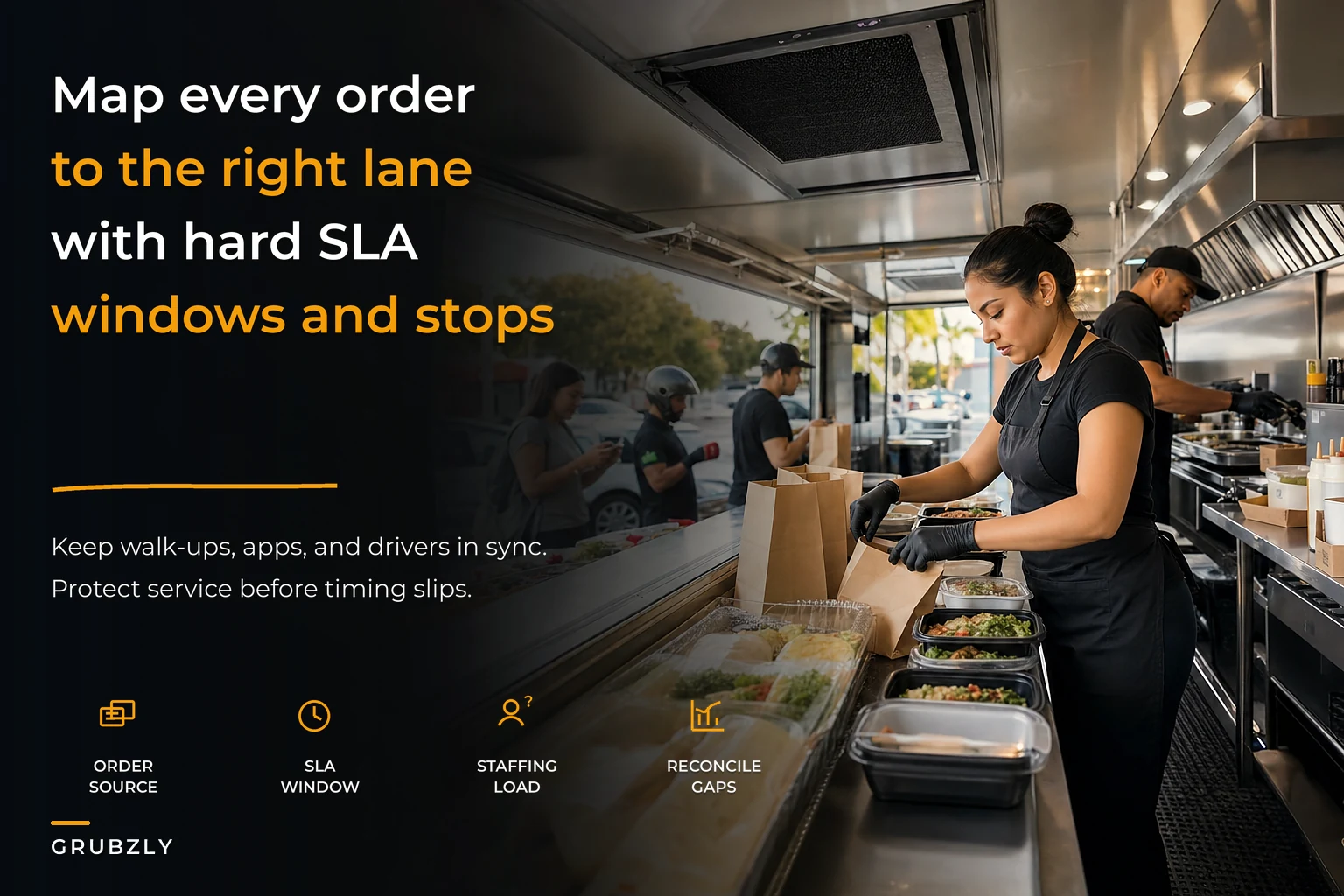
Here's a quick workflow visualization to help map channels to distinct fulfillment lanes.
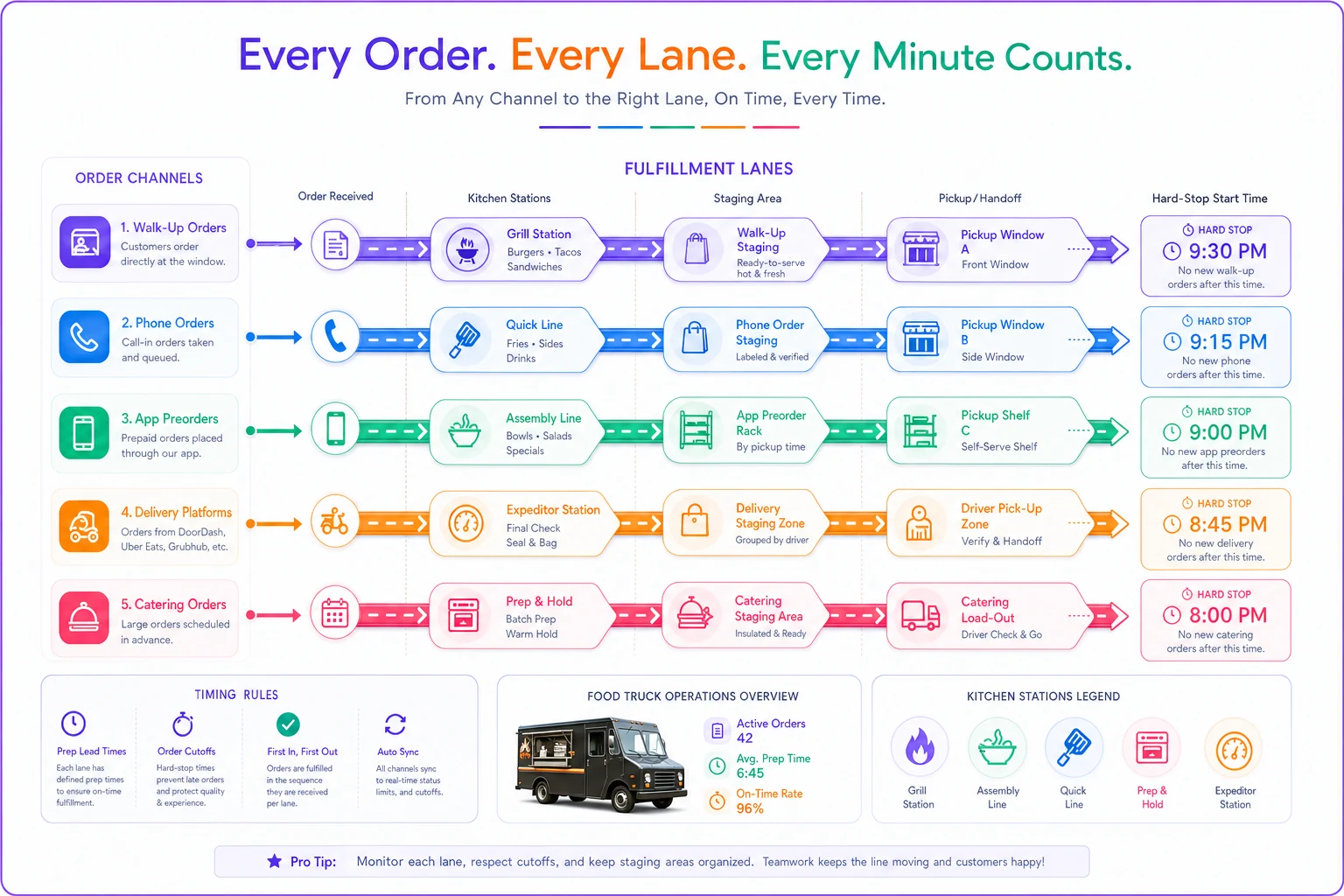
The trick is building hard stops between lanes. A preorder for 1pm doesn't start until 12:45, period. Even if your kitchen is dead slow at 12:15. This sounds restrictive but it actually creates predictability—your team knows exactly when to start each type of order instead of constantly guessing priorities.
Building pickup windows that prevent the midday scramble
The worst operational mistake I see: letting customers pick any pickup time they want. You end up with seventeen orders all due at 12:15, then nothing until 12:45. Your kitchen gets crushed, then sits idle.
-
Offer 15-minute pickup slots
-
Cap each slot at your actual capacity (not your wishful capacity)
-
Build 5-minute buffers between heavy slots
-
Block out your known rush periods entirely for preorders
A Korean fusion truck I worked with in Portland switched from open pickup times to structured 15-minute windows. They capped each window at 8 orders based on their actual kitchen capacity. Their on-time fulfillment went from around 60% to 92% in about three weeks.
Cap slots using actual completed-order data from a typical service hour, not optimistic estimates.
They also discovered something interesting: customers actually preferred the structured windows. It set clear expectations. No more "it'll be ready in about 20-30 minutes maybe." You pick 12:30-12:45, your food is ready in that window, done.
Batching rules that make sense in a 100-square-foot kitchen
Batching orders sounds great until you realize you're trying to batch a burger, three tacos, and a rice bowl. Not exactly efficient. Real batching in a food truck means grouping by cooking method and pickup window—not just by time.
Here's what actually works:
Protein batching: If you're firing up the grill for one burger, check all orders in the next 15-minute window for burgers. Cook them together, hold them properly staged.
Fryer batching: Never drop single portions. Always check the next 2-3 orders for fried items. Your fryer recovery time makes single drops incredibly inefficient.
Cold prep batching: Salads, cold sides, drinks—batch these by pickup window during slower periods. They hold better than hot food.
The critical part: hard cutoff rules. Don't batch orders more than 15 minutes apart. The efficiency gain isn't worth the quality loss or timing confusion.
One Mediterranean truck created what they called "batch cards"—literally index cards that showed which items could batch together and their hold times. Sounds basic, but it stopped their prep cook from making judgment calls that threw off timing for the whole service.
Staffing impacts nobody talks about
Adding an omnichannel ordering system food truck setup doesn't just mean more orders—it fundamentally changes your staffing needs. You can't run the same three-person crew harder and expect it to hold together.
Walk-ups need someone taking orders and payment. That person can't also be managing tablet orders and phone calls. Once you add delivery and preorders, you need a dedicated "digital expediter" who manages all non-walk-up orders. This isn't a luxury.
-
Order taker
Walk-ups only, handles payment and customer questions
-
Digital expediter
Manages all other channels, stages orders, coordinates with drivers
-
Kitchen lead
Controls production flow based on the fulfillment matrix
-
Prep/float
Supports wherever the bottleneck appears
A BBQ truck in Memphis fought this for months, trying to have their cashier handle everything. They were averaging 23-minute ticket times during lunch. They added one person as digital expediter and ticket times dropped to 14 minutes. That extra $150 in daily labor cost generated around $400 more in revenue just from being able to handle more orders without falling apart.
Reconciliation checkpoints that prevent the 2pm disaster
You know that moment around 2pm when you realize you've been making orders out of sequence and now you have eight angry customers and three cold orders nobody claimed? That's what happens without reconciliation checkpoints.
-
Every 30 minutes
Match completed orders to pickup slots. Any orphan orders sitting more than 15 minutes get flagged.
-
Before each rush
Verify all preorders for the next hour are staged or in the production queue.
-
After each delivery pickup
Confirm the driver took the correct orders, mark delivered in the system.
-
End of shift
Full reconciliation of all channels against actual sales.
The key is making these checks systematic, not reactive. Set phone timers if you have to. A breakfast burrito truck started doing 30-minute "order audits"—literally 60 seconds of verifying all orders matched their status. It caught countless issues before they became customer complaints.
Stop-level disruption and the cascade effect
When you run a multi-stop route with multiple order channels, a disruption at stop one cascades through your entire day. Most operators don't think about this until it happens.
Say your 11am-1pm downtown stop gets delayed 30 minutes because of a permitted event you didn't know about. Now you have preorders for noon pickup you can't fulfill, delivery orders you need to cancel, your 2pm brewery stop customers wondering where you are, and tomorrow's preorders that assume you'll be at the same location.
-
Plan A locations
Full menu, all channels open
-
Plan B locations
Limited menu, walk-ups and preorders only
-
Emergency relocations
Walk-ups only, simplified menu
Build automatic notifications into your system. If you're not at your planned stop by a certain time, preorder customers get notified automatically. Don't make your expediter call twenty people while also trying to serve food.
The spoilage problem nobody builds a system for until it's too late
When orders get made out of sequence or sit too long, you're not just losing that sale—you're throwing away food cost. The average food truck tosses somewhere between $40-80 of food daily from order mistakes and no-shows alone. Over a month, that's your entire profit margin on 50-60 orders.
-
Hot sandwiches/burgers
10-minute hold max, then remake
-
Fried items
5-7 minutes before quality drops
-
Tacos/assembled items
15 minutes max
-
Cold items
Can stage for up to 45 minutes if properly stored
Mark every order with its "made time," not just its "due time." A piece of tape with "12:15" written in Sharpie tells anyone that order needs to go or get tossed by 12:25.
A Nashville hot chicken truck was throwing out close to $300 of product weekly from orders sitting too long. They started using kitchen timers for every staged order—one timer per pickup window. When the timer goes off, unclaimed orders get repurposed (staff meal, samples) or logged as waste. Weekly waste dropped to under $100.
The tech stack that actually works without breaking your budget
You don't need expensive unified systems. You need the right connections between affordable tools.
-
Order aggregation
Tablet that pulls orders from all channels into one screen (Square for Restaurants, Toast, or even a basic Google Sheet if you're bootstrapping)
-
Kitchen display
Separate screen showing orders by fulfillment lane and time (an old iPad with a kitchen display app works fine)
-
Customer notification
Automated SMS for pickup confirmations (SimpleTexting or automated messages through Square)
-
Driver coordination
Dedicated tablet for delivery staging (the delivery platform's tablet, placed at your staging area—not in the kitchen)
Total tech cost runs about $200-300 monthly for all systems. Compare that to losing a few hundred dollars weekly from operational chaos.
Decision framework: When to add (or cut) channels
Not every channel makes sense for every truck.
Add a channel when:
-
Your current channels run at 80%+ capacity during prime times
-
You have dedicated staff to manage the additional complexity
-
The channel adds at least 20% incremental revenue
-
You can maintain sub-15 minute ticket times
Cut a channel when:
-
It represents less than 10% of revenue but causes 30%+ of operational issues
-
Customer complaints from that channel exceed 5% of orders
-
Commission plus operational cost exceeds 35% of revenue from that channel
A gourmet grilled cheese truck cut DoorDash after running these numbers. The platform brought in roughly $400 daily but required a dedicated person during lunch, created kitchen chaos, and had a 12% order error rate. They replaced it with their own preorder system and actually increased revenue while reducing stress. Sometimes the math just doesn't work.
Building the daily workflow that doesn't break your team
Your team needs a predictable rhythm, not constant chaos.
-
Pre-service (30 minutes before first orders)
- Load all preorders for the day - Verify delivery tablet connections - Assign fulfillment lanes to staff - Set pickup window timers
-
Every hour during service
- 5-minute fulfillment check (all channels reconciled) - Adjust staffing based on next hour's order load - Clear any orders older than hold times - Update available quantities for high-demand items
-
Post-rush (after main service)
- Full channel reconciliation - Log any waste or remakes - Note operational issues for tomorrow's prep
-
End of day
- Export all channel reports - Compare actual vs. promised fulfillment times - Flag problem orders for follow-up - Set tomorrow's channel capacity based on staffing
This rhythm means your team always knows what's next instead of constantly reacting to whatever just printed.
What this actually looks like on Tuesday vs. Saturday
Your omnichannel ordering system food truck workflow can't be identical every day. Tuesday lunch at the office park runs differently than Saturday at the brewery.
-
Low-volume days (under 100 orders)
- Open all channels with standard windows - One person can manage digital expediting - Batch aggressively within windows - Run fuller menu options
-
High-volume days (over 200 orders)
- Restrict delivery to off-peak hours only - Require 45+ minute lead time on all preorders - Two people on digital/expediting - Simplified menu to reduce complexity - Close orders when you hit 80% kitchen capacity, not when you run out
A Vietnamese banh mi truck tracks their daily KPIs and adjusts channel availability based on predicted volume. Tuesdays they'll take delivery orders all day. Saturdays at the farmers market? Walk-ups and preorders only, delivery blocked entirely.
The catering wildcard that breaks everything
Catering orders don't fit any standard fulfillment lane. A $400 catering order for fifty people tomorrow can't run through the same workflow as your regular lunch service. This is where most trucks fail their omnichannel promise completely.
Catering needs its own operational track entirely. Separate prep schedule, dedicated fulfillment window, different staging area. Don't try to squeeze catering into your regular service—it'll break both.
The rule that works: catering orders get produced either before regular service starts or after it ends. Never during. Your kitchen can't handle the workflow switching, and your regular customers suffer when half your attention goes toward boxing up fifty sandwiches.
Making it sustainable with the right operational platform
Managing all these channels and rules with paper and memory breaks down fast. You need systems that enforce your fulfillment logic consistently, not just when someone remembers to check.
Modern operational platforms can automatically route orders to the right fulfillment lane based on your rules. They'll enforce pickup windows, prevent overbooking, and flag timing conflicts before they blow up. The AI automation handles the routing logic while your team focuses on actually making food.
The most successful trucks build their fulfillment matrix into their operational platform from the start. The system knows that preorders placed before 9am for lunch can batch together, but orders placed after 11am need individual handling. It knows Saturday capacity is different from Tuesday. It adjusts pickup windows automatically when you're running behind.
This isn't about fancy technology—it's about encoding your operational decisions into systems that execute them consistently. Whether you use spreadsheets, basic apps, or a full automation platform, the key is having defined rules that something enforces every single order, every single day.
The bottom line on omnichannel success
Running multiple order channels from your food truck isn't optional anymore—customers expect it. But running them poorly is worse than not running them at all. Every channel needs its own operational lane with clear rules about timing, batching, staging, and fulfillment.
The trucks that are actually succeeding with omnichannel aren't the ones with the most expensive tech or the biggest teams. They're the ones who built logical fulfillment workflows and stick to them even when it's tempting to squeeze in one more order.
Start by mapping your current channels to fulfillment lanes. Set hard rules about timing and capacity. Build checkpoints that catch problems before they cascade. Then gradually layer in technology that enforces those rules automatically.
Your omnichannel ordering system food truck setup should make operations smoother, not harder. When each channel knows its lane and stays in it, you can handle more orders with less chaos—and that's when you stop playing order tetris and start building something that actually scales.
Running multiple order channels from your food truck isn't optional anymore—customers expect it. But running them poorly is worse than not running them at all. Every channel needs its own operational lane with clear rules about timing, batching, staging, and fulfillment.
Start by mapping your current channels to fulfillment lanes. Set hard rules about timing and capacity. Build checkpoints that catch problems before they cascade. Then gradually layer in technology that enforces those rules automatically.
Ready to drive your food truck business forward?
Join 2,000+ food truck operators relying on Grubzly to boost efficiency, increase sales, and delight customers.