


The frustrating thing about running two or three trucks isn't that you don't have data. It's that you have too much of the wrong shape. Square spits out one format. Toast gives you another. The delivery marketplace emails a CSV with columns named things like fulfillmentchannelv2. Your catering deposits sit in a completely separate spreadsheet. And at the end of the week you're staring at four exports that refuse to agree on anything — not the date format, not the total, not even what counts as a "sale."
What almost nobody has is a single, consistent way to say: this dollar came from this truck, at this stop, during this service window, through this channel. That one sentence — stop-level attribution for a food truck — is the whole game. Get it right and your routing, pricing, and staffing decisions sharpen fast. Miss it and you're guessing with confidence, which is honestly worse than guessing with doubt.
This piece lays out a canonical schema you can copy into Airtable or a spreadsheet today, the transform rules to get there from the common exports, and the reconciliation cadence that keeps it honest.
Built for 1–5 truck operations, where you don't have a data team and probably don't want one.
Why the data never lines up on its own
Every system you use was designed to answer its own question, not yours. Your POS wants to know what a terminal rang up. The marketplace wants to know what orders it passed to you. Your accountant wants to know what hit the bank. None of them care about the stop.
And the stop is the only unit that actually matters operationally. A truck doing the brewery Tuesday night and the office park Wednesday lunch is running two completely different businesses with the same equipment. If your numbers roll up to "Truck 2 did $4,100 this week," you've thrown away the only thing that could tell you the brewery is carrying the office park.
In practice the breakdown usually looks like this: a single POS login shared across trucks because setting up separate accounts was a pain. Two terminals on the same truck during a festival. A staffer who forgot to switch the location tag after the morning stop, so the lunch sales got filed under the breakfast spot. Multiply that across a month and your "data" is a confident-looking lie.
The fix isn't more discipline from your crew — it's a schema that forces every row of raw export data to resolve to a stop before it's allowed to count. The discipline lives in the transform, not in your staff's memory at 11pm.
The canonical schema
Think in three layers: stops, transactions, and reconciliation. Keep them as separate tables (or sheets) that link by ID. Resist the urge to flatten everything into one giant sheet — that's what collapses the moment you add a fourth truck.
Stop losing sales to poor planning.
Grubzly helps you plan routes, track inventory, and maximize daily sales effortlessly.
- Real-time route optimization
- Inventory tracking & alerts
- Mobile sales & reporting
No credit card required
Table 1: stops (the backbone)
| Field | Type | Definition / Notes |
|---|---|---|
stop_id | text (PK) | Canonical ID. Format: YYYYMMDD-TRUCK-SEQ e.g. 20240612-T2-01 |
date | date | Service date (not load date) |
truck_id | text | T1, T2… matches your fleet roster |
venue_name | text | Human-readable: "Eastside Brewery" |
venue_type | single-select | brewery / office / festival / private / market / street |
scheduled_start | datetime | Planned service open |
scheduled_end | datetime | Planned service close |
actual_start | datetime | Filled at close — when you actually started ringing |
actual_end | datetime | When you stopped |
labor_hours | number | Total crew hours allocated to this stop |
permit_cost | currency | Stop-specific fees / booth cost |
notes | long text | Weather, equipment issues, anything odd |
The stop_id is the hinge the whole system turns on. Every transaction must point back to one. No orphan rows allowed.
Table 2: transactions (the money)
| Field | Type | Definition / Notes |
|---|---|---|
txn_id | text (PK) | Source system's ID, prefixed by channel: sq, ts, mkt, cat |
stop_id | text (FK) | Links to stops. This is the attribution. |
source_system | single-select | square / toast / marketplacea / marketplaceb / cash / catering |
channel | single-select | walkup / online_pickup / delivery / catering |
gross_amount | currency | Pre-discount, pre-tax item total |
discount_amount | currency | Promos, comps |
tax_amount | currency | Collected tax |
tip_amount | currency | Separated — never buried in gross |
fee_amount | currency | Processor + marketplace commission |
nettobusiness | currency | What you actually keep |
txn_timestamp | datetime | Source timestamp, converted to local |
item_count | number | Line items, for throughput math |
The split between grossamount, feeamount, and nettobusiness is where most small fleets lie to themselves. A marketplace order showing $42 gross might net you $29 after commission. If your dashboard only tracks gross, delivery looks like a hero channel when it's actually your thinnest margin. Keeping these as separate columns forces honesty.
Table 3: reconciliation (the proof)
| Field | Type | Definition |
|---|---|---|
recon_id | text (PK) | stopid + sourcesystem |
stop_id | text (FK) | Links back |
source_system | single-select | which export |
sourcereportedtotal | currency | What the export claims |
schemacomputedtotal | currency | Sum of your transaction rows |
variance | currency | computed minus reported |
variance_flag | checkbox | TRUE if abs(variance) > $5 |
resolved | checkbox | You've explained the gap |
resolution_note | text | "Two refunds not in export yet" etc. |
These three tables together give you something none of your source systems provide on their own: a clean, auditable trail from raw export to stop-level economics. The schema is deliberately lean — twelve columns per table, not thirty — because a schema you actually maintain beats a comprehensive one you abandon by week three.
Transform rules: from export to canonical
The exports are the enemy. Here's how to tame the common ones. The principle throughout: never type a stop_id by hand into a transaction row. You map it with a rule.
Square exports. Square gives you a device/location name per transaction. Build a lookup that maps each device name plus date to a stopid. The gotcha: if a device served two stops in one day, the time window from your stops table decides. A transaction at 11:47am on 2024-06-12 from device "Truck 2 Window" falls into whichever stop's actualstart–actualend contains that timestamp. This is exactly why you fill actualstart/actual_end at close, not never.
Toast exports. Toast tends to bundle tips and fees differently and has its own timezone handling. Your transform needs to (1) convert timestamps to local, (2) pull the processor fee out of the payment detail rather than the order detail, and (3) treat voided-then-rerung orders as a single transaction, not two.
Marketplace CSVs. These are the worst offenders. They report their commission inconsistently — sometimes as a line item, sometimes netted silently. Always reconstruct nettobusiness yourself from gross minus fee; never trust their "payout" column, because payouts batch across days and won't tie to a single stop. Attribute by the marketplace's pickup or delivery timestamp against your stop windows.
Cash and catering. Cash gets a manual mini-export — one row per stop with a counted total. Catering lives in its own world (deposits weeks ahead, balance on the day), so attribute the service-day revenue to the stop and track the deposit separately so it doesn't double-count.
A clean transform sequence:
-
Pull all raw exports for the week into a staging area, untouched.
-
Normalize column names and types (dates, currency as numbers not strings).
-
Convert every timestamp to a single local timezone.
-
Split gross / tax / tip / fee into their own fields.
-
Assign
stop_idvia the device-or-channel + time-window lookup. -
Flag any transaction that can't resolve to a stop → manual queue.
-
Compute
nettobusinessper row. -
Roll up per stop per source and write the
reconciliationrows. -
Resolve every variance flag before the numbers are "closed."
Here's a simple diagram of the transform workflow.
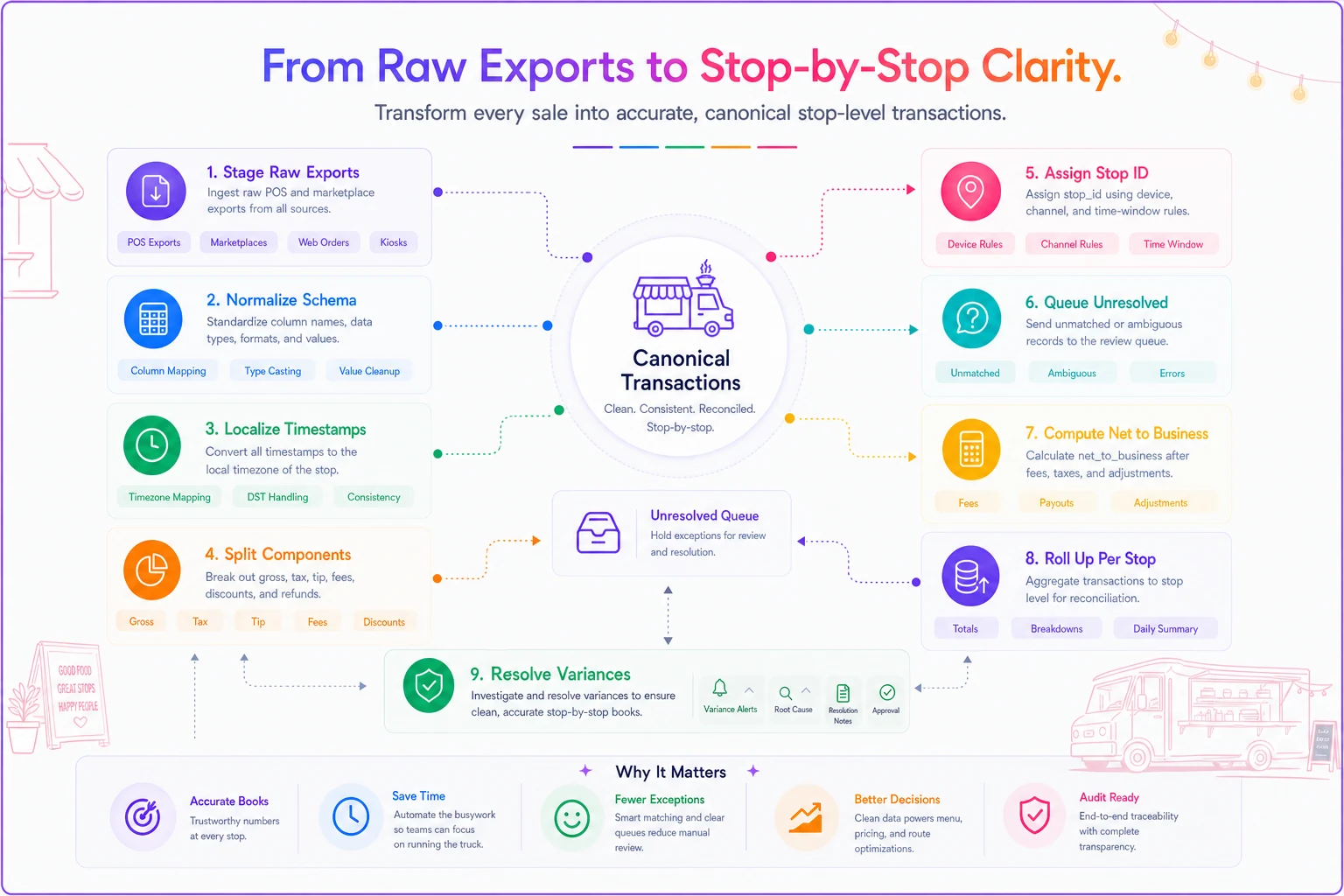
Step 6 is the one people skip. Unresolved rows don't disappear — they quietly distort the total. Put them in a visible queue so a $17 orphan isn't hiding inside a $4,000 week.
A worked example: three stops, one messy Wednesday
Two-truck operation. Wednesday, Truck 2 runs an office park lunch, then a brewery evening. Truck 1 does a single market stop.
Raw exports come in:
-
Square
182 transactions across both trucks, one shared location name.
-
Marketplace A
11 delivery orders, gross $486, "payout" column batched across days and useless for attribution.
-
Cash
counted at each close.
After the transform, the stop-level picture:
| stop_id | venue | gross | fees | net | item_count | labor_hrs |
|---|---|---|---|---|---|---|
20240612-T2-01 | Office park lunch | $1,340 | $71 | $1,269 | 128 | 8 |
20240612-T2-02 | Eastside Brewery | $2,110 | $118 | $1,992 | 176 | 10 |
20240612-T1-01 | Riverside Market | $890 | $44 | $846 | 94 | 6 |
Now the decisions get obvious. The brewery nets around $199 per labor hour; the office park around $159; the market around $141. Before attribution, all of this was one blended "Wednesday did $4,340" number that told you nothing useful. After attribution, you can see the brewery is carrying the day and the market stop is the one worth questioning — different day, shorter window, maybe it goes.
This kind of per-stop economics only works if your costing underneath is solid, which ties directly into recipe-level margins. The per-stop P&L and portion costing work is the natural partner to this schema. Attribution tells you where the money came from; costing tells you what it actually cost to make.
Reconciliation cadence
Attribution without a cadence rots. Exports keep changing after the fact — refunds post late, marketplace payouts settle days later, a chargeback shows up two weeks out. So you reconcile in passes, not once.
Daily (5 minutes, at close). Fill actualstart/actualend and labor_hours for each stop. Enter the cash count. That's it — you're capturing the stuff that's impossible to recover later.
Weekly (20–30 minutes). Run the full transform. Resolve every variance flag over $5. Clear the orphan queue. This is your real close — the small-data governance playbook covers how to keep tiny datasets trustworthy without drowning in process, and most of the logic there applies directly here.
Monthly (30 minutes). Re-pull the prior month to catch late refunds and settled payouts, then lock it. Once locked, the month is immutable — late adjustments go into a correction row dated to the current period, never silently rewriting history.
Checklist for the weekly close:
-
All stops for the week have a row with
actualstart/actualendfilled -
Every raw export pulled and staged
-
Timestamps converted to local timezone
-
Every transaction resolves to a
stop_id(orphan queue empty) -
Gross / tax / tip / fee split on every row
-
nettobusinesscomputed, marketplace payouts ignored in favor of gross-minus-fee -
Reconciliation row written per stop per source
-
All variance flags over $5 resolved or noted
-
Cash counts entered and matched
Running this cadence consistently matters more than getting the schema perfect on day one. A slightly imperfect schema you actually close every week beats a pristine one you abandon by week two.
When this schema makes sense — and when it doesn't
When it's worth it: You're running two or more trucks, or one truck hitting genuinely different venue types. You use more than one sales channel. You're making real routing and scheduling decisions and want them grounded in per-stop economics rather than gut feel.
When it's overkill: A single truck parked in the same spot five days a week, one POS, mostly card. A weekly sum is probably fine. Don't build a reconciliation table to attribute revenue that only ever comes from one place.
Who should not do this yet: If your basic daily close isn't happening at all — cash isn't counted, the POS sync is a mystery — fix that first. Attribution sits on top of a reliable close. Building the fancy layer before the foundation just gives you precise-looking garbage.
One honest note: don't over-engineer the stop_id format or add fields you'll never fill. The tables above are deliberately lean for exactly that reason. Start there and add columns only when something you actually need keeps falling through the cracks.
How the pieces connect as you grow
With one truck, this all lives in a spreadsheet and the transform is you, on Sunday, with coffee. That's fine and it works.
At two or three trucks the manual transform starts cracking — shared POS logins, overlapping time windows, marketplace CSVs in three different formats. The lookup rules need to be automated rather than eyeballed, because a person mapping 600 transactions a week to stops will make errors, and those errors compound into bad routing calls. The practical move is wiring the exports into a small pipeline that applies the transform rules consistently — the minimal integration architecture for small fleets covers how to connect these sources without building something unmaintainable. The schema here is exactly what that pipeline should output.
At four or five trucks, attribution stops being a reporting nicety and becomes the actual control system. You're deciding which truck covers which stop based on net-per-labor-hour by venue type, and that only works if last month's numbers are clean and comparable. The reconciliation cadence is what keeps them comparable.
The schema itself doesn't change much as you scale. The stops, transactions, and reconciliation tables look essentially the same at one truck or five. What changes is who runs the transform — you, then a tool, then something you barely think about. Design the tables right once, and the growth is mostly just plumbing.
Stop-level attribution isn't a reporting feature you bolt on at the end. It's the shape your data should have been in from the first shift. Build the three tables, write the transform rules down so they're not living only in your head, and run the cadence. Everything downstream — routing, pricing by stop, deciding which gigs to keep — gets easier the moment every dollar knows exactly where it came from.
Ready to drive your food truck business forward?
Join 2,000+ food truck operators relying on Grubzly to boost efficiency, increase sales, and delight customers.