

Most food truck operators treat the manifest as a formality. It's the scribbled sheet taped to a tote, the group text that says "both coolers loaded, heading out," the spreadsheet somebody updates when they remember. That works fine with one truck. The moment you're running two or three trucks out of a shared commissary on overlapping prep windows, the manifest stops being paperwork and becomes the thing that decides whether your day falls apart or runs clean.
The problem isn't that operators lack a manifest. It's that their manifest is human-readable only. A person can glance at it and mostly understand it. But nothing else can — not a scanner, not a reconciliation report, not the next person in the chain who wasn't there when it was loaded. When the manifest only lives in one brain, every handoff becomes a verbal re-explanation, and verbal re-explanations are where product goes missing and blame starts flying.
This piece lays out a machine-readable commissary to fleet manifest schema: a structured format, naming conventions for QR/LoadIDs, a handoff scan-and-photo workflow, a QC sampling plan with real acceptance thresholds, and escalation SLAs. The goal is something a two-to-five truck operation can actually stand up in a few days, not a warehouse-grade WMS you'll never finish configuring.
Why "it's all on the sheet" breaks at scale
With one truck, the person who loads is usually the person who drives and the person who serves. There's no handoff. The manifest can be a mess because the knowledge never leaves the body that holds it.
Add a second truck and a shared commissary slot, and you've introduced three new failure surfaces at once: loaders who aren't drivers, totes that look identical across trucks, and a prep window where two crews are grabbing from the same walk-in. Now the "sheet" has to survive being read by someone who wasn't there. It almost never does.
A typical example looks like this. A commissary preps for three trucks on a Saturday. Truck A and Truck C both run the carnitas menu, so they both get near-identical cambros of pork. Loader stages everything near the door. Truck C's driver arrives first, grabs the cambros closest to the door — which happen to be Truck A's larger-count batch — and leaves. Truck A shows up, comes up two cambros short, and now someone's calling the commissary mid-route asking if they forgot to prep. Nobody forgot anything. The product was just unlabeled in a way a machine (or a stranger) could verify.
What breaks at scale isn't the cooking. It's identity and chain-of-custody. Who owns this tote, which load does it belong to, was it verified at pickup, and can you prove it later. A good manifest schema answers all four without anyone having to remember anything. This is the same structural failure that shows up when operators try to scale from one truck to a fleet — the informal systems that carried the first truck quietly stop working around truck two or three.
The manifest schema: a copy/paste CSV
Start with a flat CSV. Not a database, not an app — a file your staging crew can open on a tablet or print. Flat CSV is deliberate: it opens in anything, it imports into anything, and it survives the commissary wifi dying. Here's the schema, column by column.
Stop losing sales to poor planning.
Grubzly helps you plan routes, track inventory, and maximize daily sales effortlessly.
- Real-time route optimization
- Inventory tracking & alerts
- Mobile sales & reporting
No credit card required
loadid,lineitemid,truckid,servicedate,stopid,category,sku,description,qty,uom,lotcode,tempzone,preptimestamp,stagedtimestamp,qcflag,handoffstatus,notes
| Column | What it holds | Example | Why it matters |
|---|---|---|---|
load_id | The whole load for one truck/day | 20250614-TRK2-A | The parent key everything rolls up to |
lineitemid | One row per physical item/tote | 20250614-TRK2-A-014 | Lets you scan a single tote, not a whole load |
truck_id | Which truck owns it | TRK2 | Stops the Truck A/Truck C mixup |
service_date | Date of service, not prep | 2025-06-14 | Prep and service aren't always same day |
stop_id | Which stop this item is for | BREWERY-PM | Enables per-stop staging and pack order |
category | Cold / hot / dry / supply / cash | COLD | Drives temp checks and load sequence |
sku | Your internal item code | PORK-CARN | Ties back to recipe costing & inventory |
description | Plain-English label | Carnitas, cooked | Human sanity check |
qty | Count or weight | 18 | The number QC samples against |
uom | Unit of measure | LB / EACH / CAMBRO | Removes "18 of what?" ambiguity |
lot_code | Prep batch / supplier lot | CARN-0614-02 | Traceability for recalls and complaints |
temp_zone | Required holding temp band | ≤40F | What the handoff photo should confirm |
prep_timestamp | When it was finished | 2025-06-14T06:42 | Time-in-danger-zone math |
staged_timestamp | When it hit the staging area | 2025-06-14T07:05 | Gap tells you how long it sat |
qc_flag | PASS / FAIL / HOLD | PASS | Set during sampling, below |
handoff_status | PENDING / SCANNED / DISPUTED | SCANNED | The chain-of-custody field |
notes | Free text | Short 2 cambros, see TRK2 driver | Exceptions |
The reason this is machine-readable and the taped-up sheet isn't: every row has a stable lineitemid, every item carries its own identity, and the file can be diffed, imported, or reconciled by something other than a tired human at 6am. When a dispute happens, you don't argue — you filter the CSV by truckid and handoffstatus and the answer is right there.
One design note worth flagging: keep one row per physical thing you'd scan. Operators get tempted to collapse "3 cambros carnitas" into one row with qty 3. Don't. If one cambro is the one that got left behind, you want a line for it. The extra rows cost nothing and save every argument.
QR and LoadID naming rules
The LoadID is the backbone, so the naming rule has to be boring, predictable, and collision-proof. Clever naming schemes always break the first time two people interpret them differently.
Use this pattern for the load_id:
YYYYMMDD-TRK{n}-{slot}
Example: 20250614-TRK2-A
-
Date first so files and labels sort chronologically on their own.
-
Truck ID next so a glance tells you ownership.
-
Slot letter (A/B/C) for trucks that run more than one load per day — a lunch load and a dinner load aren't the same chain of custody and shouldn't share an ID.
For the per-item lineitemid, just append a zero-padded sequence: 20250614-TRK2-A-014. Zero-pad to three digits even if you'll never hit 100 items. Mixed-length IDs (-14 vs -140) sort wrong and scan inconsistently.
-
One QR per
lineitemid. The QR encodes the full lineitemid string and nothing else. Resist the urge to cram descriptions into the code — the CSV already holds the description, and the QR should stay dumb and durable. -
Never reuse an ID. Even if a load is cancelled, that ID is burned for the day. Reuse corrupts your history.
-
Human-readable fallback printed under the QR. Scanners fail, phones die, codes smear from condensation. The text string under the barcode is your insurance.
-
Color-band by truck on the physical label. TRK1 = blue edge, TRK2 = green, TRK3 = orange. The machine reads the QR; the human eye reads the color across a crowded staging area. Both layers matter.
-
No spaces, no slashes, no special characters. Those break file names and some scanner apps. Hyphens only.
The color-band point gets underrated. The QR is for verification; the color is for speed. In a jammed staging zone a loader shouldn't have to scan to know which pile is which — they should see it from across the room and only scan to confirm.
The handoff scan + photo workflow
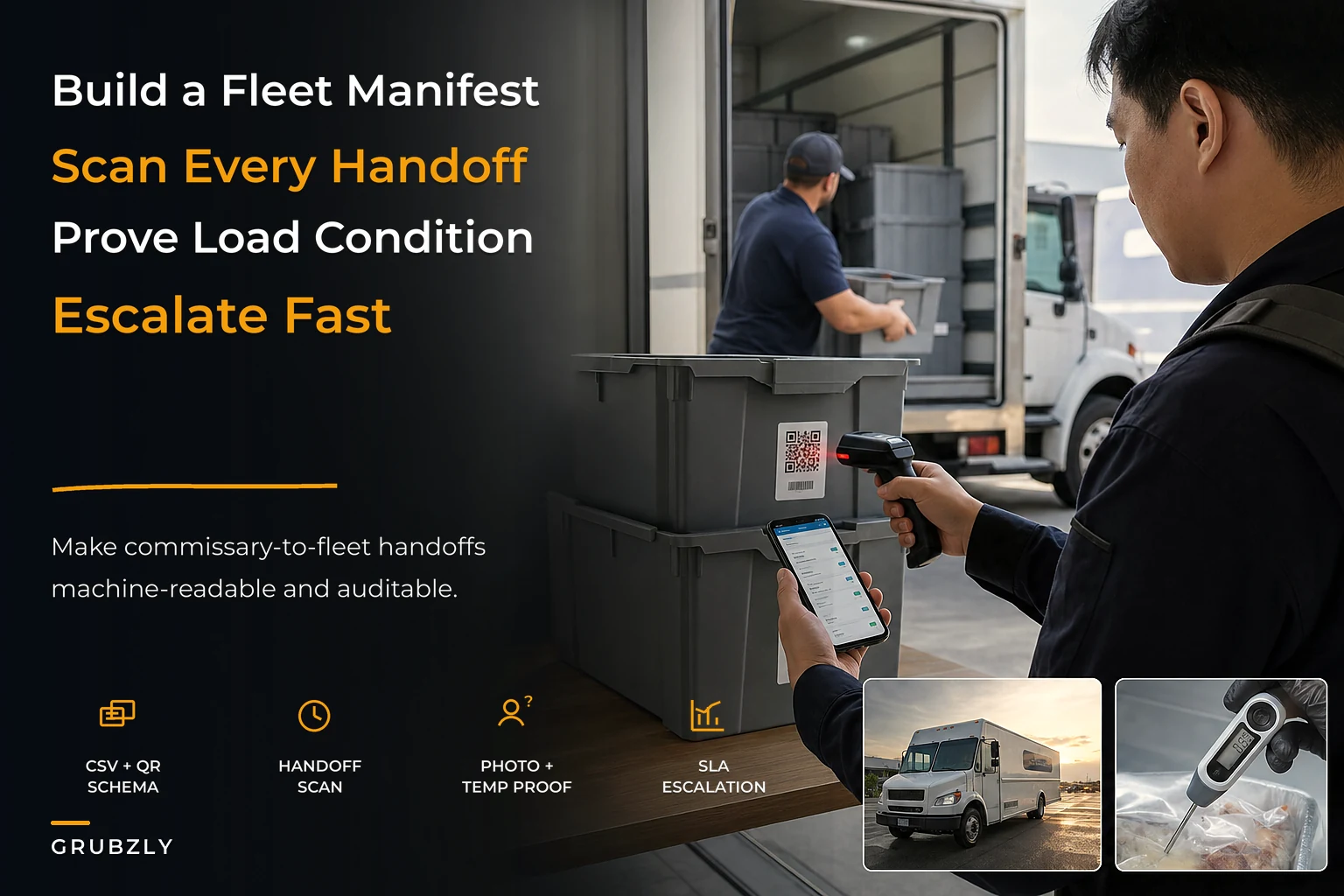
This is the moment the manifest proves itself. The handoff is the single point where ownership legally and practically transfers from commissary to truck, and it's where most "I never got that" disputes start. The workflow has to be fast enough that a driver in a hurry still does it.
-
Loader stages by
stopidandtruckid, scanning each tote as it hits the staging zone. Scan setsstagedtimestampand flipshandoffstatustoPENDING. -
Driver arrives and scans each tote they physically take. Each scan flips that row's
handoff_statusfromPENDINGtoSCANNED. -
At the end of the scan, the system compares scanned items to the full
load_id. Any row stillPENDINGis a short. Any scan that doesn't match the load is an extra (probably another truck's item). -
Driver takes one wide photo of the fully loaded truck interior, plus one close photo of any cold item's thermometer reading. Attach both to the
load_id. -
Driver confirms. If counts match, the load closes as verified. If not, it stays open and the exception path starts (next section).
The photo step does two jobs. The wide shot is your condition-at-handoff evidence — if a cambro lid pops in transit and product spills, you can prove it was intact when loaded. The thermometer shot timestamps your cold chain at the exact moment of transfer, which is the evidence that actually matters if there's ever a temperature complaint.
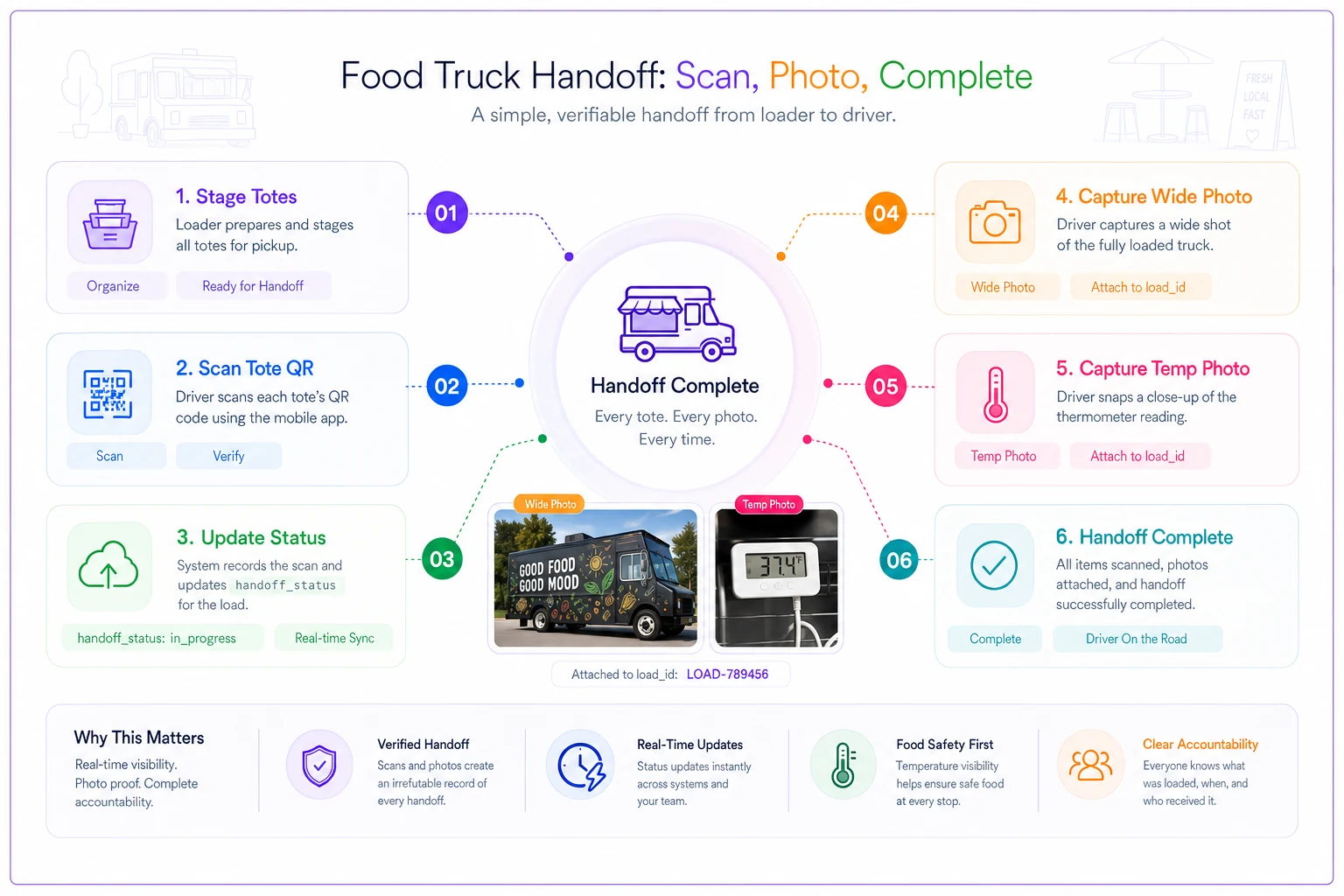
A workflow detail that separates teams who make this stick from teams who abandon it: the driver scans, not the loader-on-the-driver's-behalf. It's tempting to let the loader scan everything "out" to save the driver time. Don't. The whole point is that the person taking custody is the one who confirms custody. The second you let one person scan both sides, the chain-of-custody evidence is worthless because it proves nothing about what actually left the building.
Drivers should always perform the final scans themselves to preserve chain-of-custody.
If you're building the underlying connections between staging, scanning, and your reconciliation reports, the structural thinking in minimal integration architecture for small food truck fleets covers how to keep these pieces loosely coupled so one failing tool doesn't take the whole workflow down.
QC sampling plan with acceptance criteria
You can't 100%-inspect every load on a busy Saturday — nobody has the labor. So you sample. The point of a sampling plan is to catch systematic problems (a prep station consistently under-portioning) without inspecting everything.
Here's a workable plan for a small fleet. Sample sizes are small on purpose — this is attribute sampling for a two-to-five truck operation, not an aircraft parts line.
-
Count accuracy Pull 4 line items at random per
load_id. Verify physical count againstqty. -
Temperature Check every cold item on the thermometer photo, plus physically probe 2 random cold items.
-
Label integrity Check that 100% of items scanned clean (any item needing a manual re-key counts as a label defect).
-
Lot traceability Pull 1 item per load and confirm
lot_codematches the prep log.
| Check | Accept | Hold (re-inspect) | Reject (fix before truck leaves) |
|---|---|---|---|
| Count accuracy | 0 miscounts in sample | 1 miscount | 2+ miscounts in the 4 |
| Cold temp | all ≤40°F | one item 41–45°F | any item >45°F |
| Label scan | ≥95% clean scan | 90–94% | <90% |
| Lot match | matches | — | mismatch |
A "Hold" means you widen the sample — pull 4 more items. If the second sample passes, release it. If it fails again, treat it as Reject for that category and fix the root cause before the truck rolls. A "Reject" never means "scrap the food" automatically; it means stop and resolve, whether that's recounting, re-chilling, or relabeling.
The insight most operators miss: sampling is a feedback tool, not a gate. If Truck 2's loads keep failing count accuracy and others don't, you don't have a loading problem — you have a Truck 2 driver or a specific prep station problem. The sampling data tells you where to look, which is worth far more than the individual catch. Over a month, the pattern in your qc_flag column is more valuable than any single inspection.
Escalation SLAs: who does what, and how fast
A manifest without escalation rules just documents problems — it doesn't resolve them. When a handoff comes up short or a QC check fails, people need to know who to call and how long they have before it climbs to the next level. Without SLAs, a short tote becomes a 40-minute phone-tag session while the lunch window burns.
-
Tier 0 — On-site self-resolve (target
under 5 min).
Short count or scan mismatch caught at handoff. Driver and loader recount together against the CSV. Most issues die here. -
Tier 1 — Commissary lead (target
15 min).
Can't self-resolve, or a QC Reject. Commissary lead decides: re-prep, substitute, or send short with a documented note. The decision goes in thenotesfield with a timestamp. -
Tier 2 — Operations owner (target
30 min, blocking).
Anything that threatens service — the truck will open late or run out at a stop. Owner makes the call on routing, menu adjustment, or pulling product from another truck. -
Tier 3 — Food safety hold (immediate, non-negotiable). Any temperature reject above the danger threshold or a lot traceability failure. Product is held, not loaded, full stop. No SLA clock — this one doesn't get traded against being on time.
What makes SLAs real is that the clock is tied to a timestamp in the manifest, not to someone's memory. When handoff_status flips to DISPUTED, that's the moment the Tier 0 clock starts. If it's not resolved when the next tier's window closes, it escalates automatically. This is also where procurement and the manifest connect — if your commissary keeps hitting Tier 1 substitutions, the real fix lives upstream in your commissary procurement systems and vendor SLAs, not in faster escalation at the loading dock.
A minimal automation map you can build in days
You don't need a custom platform to run this. The schema is designed so you can automate it in layers, adding only what earns its keep. Here's the realistic build order.
-
Day 1 — The CSV + labels. Set up the schema in a shared sheet. Generate QR labels from the
lineitemidcolumn (a free QR batch generator or a label template works). Print, color-band by truck. You now have a machine-readable manifest even with zero software. -
Day 2 — Scanning. Use a basic inventory scan app (most read QR into a sheet row) so the driver's scans write
handoff_statusand timestamps automatically. The match-check — scanned vs. full load — can be a simple formula that flags anyPENDINGrows. -
Day 3 — Photos + exception routing. Wire the handoff photos to attach to the
load_id(a shared folder named by LoadID is enough to start). Set up one alert: when a row goesDISPUTED, the commissary lead gets pinged. That single alert covers most of your Tier 1 escalation. -
Week 2 — Reporting. Pivot the
qcflagandhandoffstatuscolumns to see which truck, stop, or prep station generates the most exceptions. This is where the pattern-finding pays off.
The automation worth adding is the boring, repetitive matching and alerting — comparing scanned items against the manifest, flagging shorts, routing exceptions to the right person, rolling QC flags into a weekly pattern. That's exactly the kind of low-judgment, high-frequency work where light automation removes human error without taking away any decision that actually needs a person. The cooking, the substitution calls, the food-safety holds — those stay human. The counting and the cross-checking don't have to be.
A quick real scenario
A three-truck taco operation sharing a commissary kept losing roughly 20–30 minutes every Saturday morning to loading confusion and mid-route "did you forget my pork?" calls. They were averaging around three shorting incidents a weekend, and at least once a month one turned into a truck opening late at a brewery stop — a stop that does maybe $600–$900 in its first ninety minutes.
They moved to the schema above: flat CSV, one row per tote, QR plus color-band labels, driver-side scanning, and the four-item QC pull. Nothing fancy — the whole thing ran out of a shared sheet and a free scan app for the first month. Within about three weeks, the morning confusion mostly disappeared because grabbing the wrong truck's cambro now failed the scan immediately. Shorting incidents dropped to roughly one every couple of weeks, and the ones that happened got caught at the dock instead of on the road. The late opening hasn't recurred since. The owner's comment was basically that the value wasn't catching more mistakes — it was that disputes stopped being arguments and became a filtered view of a spreadsheet.
When this is worth it — and when it isn't
When it makes sense: You're running two or more trucks, or one truck plus a catering line, out of a shared or busy commissary. The moment loading and driving are done by different people, you need machine-readable identity and a real handoff. If you've ever had a "who took my product" conversation, you're already past the threshold.
When it's overkill: Single truck, same person loads and drives, no shared commissary. You don't have a handoff, so you don't have a chain-of-custody problem. A time-stamped loading checklist is plenty — don't build infrastructure for a failure mode you don't have.
Who should not do this yet: Operators whose prep timing and recipes aren't stable. If your prep batches change size week to week with no standard, the manifest will just document chaos faster. Stabilize the thing being loaded before you build the system that tracks it.
The manifest is one of those operational pieces that looks like overhead until the day it saves your lunch rush. The point isn't the labels or the scanner — it's that identity, custody, and condition stop living in one person's memory and start living in a format anything can read. That's the difference between a fleet that argues about what went wrong and a fleet that just filters a column and fixes it.
Ready to drive your food truck business forward?
Join 2,000+ food truck operators relying on Grubzly to boost efficiency, increase sales, and delight customers.